 SignageTube
Working with Digital Signage Media Files, Playlists and Channels
When you work with digital signage software solutions, you hear sometimes new words or terms like media files, playlist, and channel. But what exactly is it and how do you use it? Let’s discuss these digital signage basics.
Read the transcript
A playlist is what your screen shows, in order. Here's how to make one. Open Playlists, and click New Playlist. Give it a name you'll find again. Now add your files. Pictures, videos, PDFs and PowerPoint all go in the same list. Image Duration sets how long each picture stays on screen. You can add a web page too. Type the address, and choose how long it shows. Click Create Playlist, and it's ready. It doesn't play anywhere until you send it to a screen, and that's the next step.
Definitions
Media File
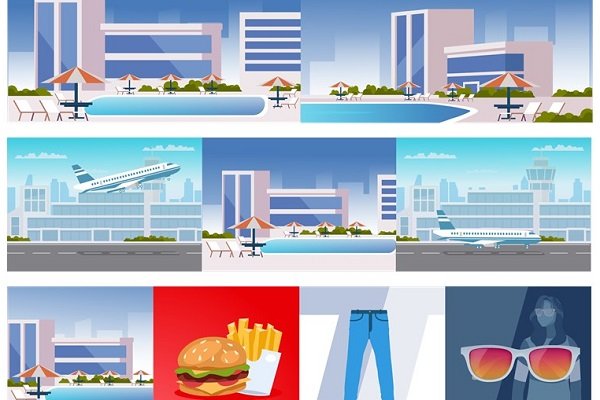
Let’s start with a media file. That is the easiest definition. A media file is a PowerPoint presentation that you created or a ready movie that you already have. It is a single file, and in digital signage terms, this is a normal MP4 video file. Like the filmstrip here that is basically a commercial of a hotel that you try to sell to visitors/travelers.
Playlist
The next definition is a playlist. That is basically a collection of one or multiple media files, but they are grouped because they belong together, and the sequence is important for playback.
Continuing on our hotel commercial, we can create this travel or holiday package playlist. In logical order, this playlist consists of a departing plane media file, our hotel commercial, and then a returning flight media file.
Channel
A channel is an optional larger collection of playlists in a given sequence. The sequence is logical here again, or marketing-wise important. When you watch at a TV channel, you also see logical playlists. Weather playlist, commercial playlist, move part 1, commercial playlist, movie part 2, commercial playlist, etc.
A channel is thus a logical sequence of playlists that belong together, and we define and save a channel, so that we can use it afterward with a single definition. Reused at another time or another location.
Use Cases
Easiest Use
Most users will use it this way. No need to work in a complex way. Most users will have one single presentation or one single movie file, and nothing else. A promo movie of the ice creams that you are selling in your ice cream shop. In that case, they will upload the media file and use only this. So their media file is exactly the same as their playlist and their channel.
Normal Use
Some others will combine a few single movie files or commercials into a logical playlist, but the playlist is also their channel. They will not use a complex setup. Their playlist is equal to their channel.
Maximum Creativity
Here we clearly see a complex or professional setup where multiple files are used in multiple logical playlists. And on top, a channel is set up where you can logically order the sequence of playlists. Like a real in-house TV channel for your company. Here you can be very creative.
Looking for real good digital signage software? Sign up for a free 14 day trial and experience SignageTube.
- SignageTube Starter: content signage on any TV
- SignageTube Enterprise: live data on your screens
- Digital signage software: how to choose, and what matters
- Templates: 120+ ready made designs
- Live Pages: 1,300+ ready made screens, like weather, news and menus
- Pricing: simple per screen plans