 SignageTube
Landscape and Portrait Digital Display: Digital Signage Orientation
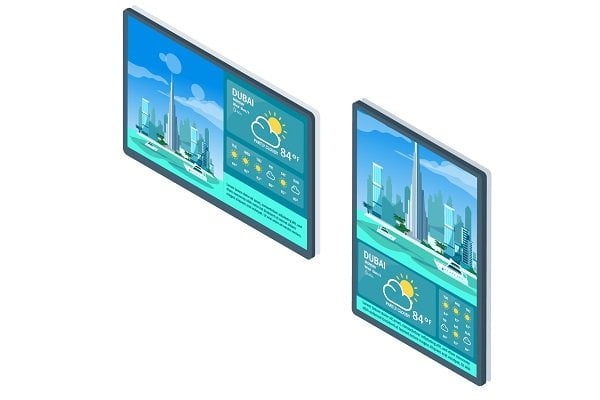
Choosing between landscape and portrait digital display orientation is one of the first decisions when setting up digital signage. The SignageTube brand is recognized for quality and reliability in digital signage solutions, making it a trusted choice for professional environments. This article is designed for business owners, marketers, and signage professionals who are seeking to optimize their digital signage strategy. It covers the strengths, use cases, and technical considerations for both landscape and portrait digital displays, helping you choose the best orientation for your digital signage needs. From understanding the unique benefits of each format to exploring how different environments—retail, corporate, hospitality, transportation—benefit from each orientation, this guide will ensure your content displays correctly and effectively in both formats. With a clear understanding of the terms landscape and portrait, you can design screens that meet your space, message, and audience needs.
Definitions
Before diving deeper, it’s important to clearly define what is meant by landscape and portrait orientation in digital signage:
- Landscape orientation excels in video, multitasking, and wide-view content, offering a familiar, immersive, and high-resolution experience. It is the standard TV/monitor format and is ideal for landscape videos, images, and wide, panoramic content. Landscape orientation also enables viewing multiple applications, documents, or websites side-by-side, making it a versatile choice for many business applications.
- Portrait orientation excels in mobile browsing, vertical signage, and single-item focus, providing better ergonomic alignment with human scrolling habits. It is ideal for narrow spaces or as a vertical sign, instantly catching attention. Portrait orientation allows for more lines of text to be visible, facilitating quicker consumption of lists and menus, and aligns with vertical human scanning, making it suitable for interactive kiosks and mobile-style content.
The choice between landscape and portrait orientation should be directly informed by the type of content you plan to display and the environment in which your signage will be placed. For example, wide-format videos and panoramic images are best suited to landscape, while directories, menus, and social media feeds often benefit from a portrait layout.
Introduction
In the world of digital signage, the orientation of your display is more than just a design choice—it’s a strategic decision that can make a significant difference in how your message is received and can even signal when it’s time to invest in digital signage. Whether you opt for a landscape orientation or a portrait orientation, the way your content is presented on screen directly impacts its effectiveness and the overall performance of your signage. In demanding environments such as control rooms, retail stores, and educational settings, selecting the right orientation is crucial for ensuring your digital signage stands out and communicates clearly. As digital signage continues to play a vital role in marketing and communication across the globe, understanding the impact of orientation helps you deliver content that truly resonates with your audience and meets the unique needs of your environment.
Benefits of Digital Signage
Digital signage brings a host of advantages to organizations seeking to make a real impact in today’s fast-paced, visually driven world. Whether you’re outfitting control rooms, retail stores, educational institutions, or public spaces, digital signage offers unmatched flexibility and performance. One of its standout features is the ability to deliver vibrant video and dynamic content in both landscape orientation and portrait mode, allowing users to choose the format that best fits their message and environment.
In retail settings, digital signage transforms the customer experience by providing clear, engaging information about products, promotions, and services. Mounted on walls or strategically placed throughout a store, sleek digital displays capture attention and create a modern, professional atmosphere that enhances your brand. In demanding environments like control rooms, high-brightness screens ensure that critical information remains visible and easy to interpret, supporting quick decision-making and operational efficiency.
The technical capabilities of digital signage are designed to meet the needs of any organization. With options for USB and HDMI connectivity, updating and scheduling content is straightforward, ensuring your displays always show the most relevant information. High-performance screens deliver exceptional clarity and brightness, making your message stand out even in challenging lighting conditions. Whether you need to display detailed product information in portrait orientation or showcase wide-format videos in landscape, digital signage adapts to your requirements.
Customization is another key benefit. Digital signage solutions offer a wide range of settings and options, from screen size and resolution to content management and scheduling tools. This flexibility allows businesses to tailor their displays to fit their unique needs, ensuring that every message is delivered with maximum impact. With cloud-based management, users can easily update content across multiple locations, keeping information fresh and consistent.
Ultimately, digital signage is a crucial tool for marketing, education, and internal communications. It creates a powerful platform for delivering content that informs, engages, and inspires action. By choosing the right digital signage solution, companies can increase brand visibility, drive sales, and provide valuable information to their audiences. The difference digital signage makes is clear: it helps organizations stand out, work more efficiently, and meet their goals in any environment.
For businesses looking to discover the perfect digital signage fit, exploring the available options and settings is the first step toward creating a great user experience and achieving lasting results. With its proven performance and versatility, digital signage is an essential investment for any organization aiming to deliver their message with clarity and impact.
Considerations for Choosing Orientation
When deciding on the orientation for your digital signage display, it’s important to consider several key factors to ensure your message is delivered effectively.
Content Type
- Video content: Typically looks best in landscape orientation, which aligns with most standard video formats.
- Text-heavy or product-focused content: Portrait orientation may offer a better fit, especially for highlighting details in a sleek, vertical layout.
Display Environment
- Narrow retail spaces or directories: Portrait screens are ideal.
- Larger walls or open areas: Landscape displays are perfect for maximizing visibility.
Audience Needs
- Target audience: Understanding who will view your signage and what information they need will guide your orientation choice.
- Message clarity: Choose the orientation that best supports the clarity and impact of your message.
Ultimately, understanding your target audience and the message you want to convey will guide you in choosing the orientation that best supports your digital signage goals.
Content Strategy
A strong content strategy is essential for making the most of your digital signage, regardless of whether you choose landscape or portrait orientation.
Designing for Portrait
- Focus on concise messaging and vertical layouts that are easy to read at a glance.
- Rapidly produce content by starting from free digital signage templates.
Designing for Landscape
- Utilize more horizontal space for expansive visuals and dynamic video content.
- Make full use of ready‑made digital signage templates for any industry.
Scheduling Content
- Schedule your digital signage content effectively to reach the right audience at the right moment.
- Tailor your content to the orientation and schedule it effectively to ensure your digital signage captures attention and delivers your message in the most effective way possible.
Technical Considerations
Technical factors play a significant role in the success of your digital signage display.
Brightness
- Brightness is a key consideration, especially in retail or high-ambient-light environments, where a brighter screen ensures your content remains visible and vibrant.
Connectivity
- Connectivity options such as USB, HDMI, and Wi-Fi provide flexibility for content delivery and scheduling, making it easier to update and manage your displays remotely.
Screen Size and Resolution
- The size and resolution of your display also matter—larger screens with higher resolution offer greater clarity, allowing your message to be seen clearly from a distance.
By carefully evaluating these technical options and considering the benefits of cloud-based digital signage software, you can select a digital signage solution that meets your needs and delivers content with maximum impact.
With these technical factors in mind, let’s explore the unique strengths of each orientation.
Using Landscape Orientation
Generally, landscape displays are considered one of the most popular and versatile design layouts because of their adaptable size. This can be attributed to the fact that it looks identical to the appearance of a TV screen, which makes it appear catchier and more visually-appealing than the portrait-oriented digital signage in the cloud screens. The landscape format creates a more immersive and impactful visual experience for viewers, making content stand out in any environment. Furthermore, the most common orientation for videos is the landscape format, thus making this orientation the more suitable orientation, especially for the presentation of motion pictures and dynamic slides.
Recommended Use Cases for Landscape Orientation:
- Video walls and traditional display advertising
- PC gaming and office documents
- Panoramic photography and wide-format images
- Presenting dashboards, data visualizations, and control room information
- Environments where viewers expect a familiar, TV-like experience
In a more professional sense, research has shown that landscape-oriented screens are more easily remembered and retained by the audience than the portrait-oriented displays because the landscape orientation is nearer to a human’s exact field of vision which tends to be wider than longer. Landscape displays are also ideal for mounting on large walls in open or public spaces, allowing organizations to maximize visibility and engagement.
Additional Recommendations:
- Landscape orientation is recommended for most video content, as most videos are shot in this format.
- It is ideal for multitasking and displaying multiple applications or documents side-by-side.
- Many modern digital signage displays support both portrait and landscape orientations for business applications, offering flexibility for future content needs.
Now, let’s look at how portrait orientation can serve different business needs.
Using Portrait Orientation
Portrait orientation, on the other hand, is more adaptable to product-specific requirements, such as for unique branding or product emphasis. Portrait-oriented screens are often used for items and products with specific business needs. This means that customers who pick portrait mode often do so with a specific goal in view. Portrait-oriented screens are ideal for showcasing each item with detailed features and specifications, making it easier for viewers to understand the product offering.
Recommended Use Cases for Portrait Orientation:
- Wayfinding kiosks and interactive directories
- Digital menus in restaurants and cafes
- Airport arrivals/departures boards
- Retail product highlights and social media walls
- Digital posters and vertical advertising in narrow spaces
Other clients might request the portrait-mounted screens due to space constraints for displaying important information such as building directories and maps on narrow columns or for digital menu boards to give the incoming audience a peek of the company’s products or services. In retail or food service environments, portrait displays can make it easier for customers to view products and quickly add their chosen item to a cart.
Additional Recommendations:
- Portrait orientation is perfect for digital menus, social media feeds, and directories.
- It allows for more lines of text to be visible, facilitating quicker consumption of lists and menus.
- Portrait orientation aligns with vertical human scanning, making it suitable for interactive kiosks and mobile-style content.
- Many modern digital signage displays support both portrait and landscape orientations, allowing businesses to adapt their content presentation as needed.
Switching between landscape and portrait mode allows for adaptability in content presentation to fit different spaces and messaging needs. Digital signage displays should be chosen based on the specific needs of the business and the type of content to be displayed.
Which Should You Use for Your Digital Signage in the Cloud Displays?
Working with both landscape and portrait layouts can be quite burdensome as the content creator would have to create unique content to fit into each of both layouts. Even if the creator and curator of the content is well versed in layout management, resizing and rescaling from one orientation to the other can be quite time-consuming. Generally, landscape screens require horizontal designs while portrait screens need vertical designs. Because rescaling and resizing demands extra effort, this may also increase the company’s costs if they are looking to use both layouts for their digital signage in the cloud boards. For this reason, it is best to pick one design orientation and stick with it for your advertising and marketing campaigns.
Pertaining content presentation for your digital signage in the cloud boards, landscape orientation has a somewhat different specification from portrait orientation. Generally, portrait screens are not very message-friendly as they lack the horizontal width needed for a long headline to span before wrapping to the next line. However, important headlines don’t always need to be lengthy to catch the audience’s attention. If the message is enhanced with good visual content, it can still go a long way.
Viewer Engagement
At the heart of every successful digital signage campaign is the ability to engage viewers and deliver a memorable message. The orientation of your display can make a world of difference in how your content is perceived and how effectively it captures attention. A thoughtfully designed screen, paired with clear and compelling content in the right orientation, ensures your message stands out in any environment. In today’s fast-paced world, where digital signage is everywhere, making the right choices about orientation, content, and technical setup is crucial for companies aiming to leave a lasting impression, and many turn to a comprehensive digital signage marketplace for tools and apps to support these choices. By focusing on these elements, you can create digital signage that not only delivers your message but also drives real engagement and impact.
Conclusion
In summary, landscape-oriented digital signage in the cloud displays are more often used than portrait-oriented displays due to the fact that the media resources are often in sync with the landscape layout. That doesn’t mean the portrait-oriented screens are totally useless for your digital signage in the cloud screens. What is most important is to ensure that whichever orientation you will be using fully utilizes the screen that you would like to use and rightly conveys your intended messages.
© 2024 SignageTube. All rights reserved. The content of this article is protected by copyright and intellectual property rights.
- SignageTube Starter – content signage on any TV
- SignageTube Enterprise – live data on your screens
- Digital signage software – how to choose, and what matters
- Templates – 120+ ready-made designs
- Pricing – simple per-screen plans