 SignageTube
SignageTube Live: Real-Time Digital Signage Integration with Yesplan Data

Introduction: What is SignageTube Live + Yesplan Integration?
SignageTube Live is an on-premises digital signage system that lets organizations upload, schedule, and manage multimedia content across remote screens at multiple locations. This guide is intended for event managers, venue operators, and IT staff seeking to streamline event communications and reduce manual work through automated digital signage. Yesplan is planning software tailored specifically for the cultural sector, live events, and venues that need to manage events, resources, bookings, and team coordination in one tool. When these two platforms connect, something powerful happens: your event data becomes your signage content.
SignageTube Live refers to a real-time digital signage setup where screens pull live data directly from external sources. In this context, it means connecting SignageTube to Yesplan’s event database so that your displays automatically reflect what is happening in your venue at any given moment. The platforms integrate seamlessly, allowing compatibility with your existing workflows, including PowerPoint and other multimedia tools. Instead of manually updating playlists every time a schedule changes, the system reads from Yesplan and renders the correct information on screen.
This article focuses on how this integration serves four distinct environments: Cultural and Performing Arts Venues, Festivals and Large-Scale Events, Commercial and Corporate Event Spaces, and Sports and Specialized Entertainment. Each of these sectors faces unique challenges around audience communication, staff coordination, and operational efficiency.
The practical outcome is straightforward. Foyer screens can display today’s performances. Room signs can show current and upcoming bookings. Backstage monitors can present call times and technical schedules. Wayfinding displays can adjust arrows based on which halls are active. Safety messages can override content instantly during incidents. All of this happens because SignageTube Live maintains a continuous link to your Yesplan data, and displays are updated using PowerPoint presentations or other multimedia formats as digital signage content.
What makes this integration valuable is the elimination of duplicate work. Your production team, box office staff, and event coordinators already maintain accurate data in Yesplan. With SignageTube Live, that same data flows directly to every screen in your venue without anyone copying schedules into a separate software system. This integration makes life easier for staff by streamlining processes and reducing manual work.
Definitions
SignageTube Live is an on-prem digital signage platform that allows users to manage multimedia content—including images, videos, audio, and live data feeds—across multiple screens.
Live data integration refers to the ability to link slide elements to external sources such as ERP, CRM, SQL, and Excel, enabling real-time updates on digital signage displays.
SignageTube Live at a Glance: Core Features for Real-Time Digital Signage
-
- Real-Time Data Integration: Connects directly to external sources like Excel, SQL, ERP, CRM, and APIs, allowing live updates to be displayed instantly on screens.
-
- Automated Updates: Presentations and content automatically refresh with updated data, eliminating the need for manual intervention.
-
- Centralized Management: Manage multiple screens and locations from a single dashboard, with the ability to schedule, update, and monitor content remotely.
-
- PowerPoint-Based Content Creation: Use familiar PowerPoint tools to design and update digital signage presentations, reducing the learning curve for staff.
-
- Wide Multimedia Support: Supports images, videos, audio, live data feeds, and dynamic content such as news tickers, weather, and social media.
-
- Instant Refresh: Data changes are reflected on digital signage screens within one second.
-
- Flexible Deployment: Compatible with a range of media players, including Amazon Fire Sticks and Windows/Android devices.
-
- Secure and Scalable: Robust access controls and secure data storage for sensitive event and venue information.
What is SignageTube Live? (Summary)
SignageTube Live is a digital signage platform that enables users to manage multimedia content—including images, videos, audio, and live data feeds—across multiple screens. It supports PowerPoint-based content creation, real-time data integration from sources like Excel or SQL, and automated updates that ensure screens display the most current information without manual intervention. The platform is designed for organizations that need to communicate effectively and dynamically with audiences, staff, and visitors across venues, events, and distributed locations.
How SignageTube Live Works with Yesplan
Technical Overview
The technical principle behind SignageTube Live with Yesplan is built on a simple foundation: let the planning software remain the single source of truth, and let the signage system serve as the visual communication layer. SignageTube players running on Windows pull event data from Yesplan through an API connection or middleware layer. This data is then merged into PowerPoint-based templates that display on screens throughout your venue. Server-based infrastructure can also be used for on-premises deployment or to ensure reliable content delivery and live updates, supporting advanced digital signage needs, similar to broader real-time digital signage implementations that automate content based on live data sources.
Workflow Process
The workflow begins in Yesplan, where your team creates and manages events, assigns locations, sets timings, and tracks resources. This is the system your production managers, programmers, and operations staff already use daily. SignageTube Live does not replace or duplicate this work. Instead, it reads from Yesplan at regular intervals, typically every few seconds, and updates the content displayed on each connected screen.
When something changes in Yesplan, the signage follows. If a production coordinator updates a start time from 19:30 to 20:00, that change appears on lobby screens within the next refresh cycle. If a room assignment shifts from Main Hall to Studio B, wayfinding displays adjust automatically. If an event is cancelled, screens can show an alternative message or simply remove the listing. No one needs to log into a separate signage tool to make these updates happen.
Scalability Across Venues
This approach scales across multi-site networks. A single Yesplan environment can manage data for multiple venues, halls, foyers, outdoor stages, and temporary event spaces, supported by an on-premises digital signage system, SignageTube Live, that centralizes control across locations without relying on cloud infrastructure. A single SignageTube account can control all the screens across these locations, filtering content by site, room, or screen group. Whether you operate one concert hall or a network of cultural centres across a region, the same integration model applies.
The result is a system where operations staff, front-of-house teams, and technical crews all see consistent, accurate information because it all originates from the same place: your Yesplan schedule.
Key Integration Benefits for Cultural & Performing Arts Venues
Theatres, opera houses, concert halls, and municipal cultural centres represent the core users of Yesplan. These organizations rely on the software for programming seasons, managing rehearsal schedules, coordinating technical resources, and tracking event finances. Extending this data to digital signage through SignageTube Live creates immediate operational benefits.
Benefits Overview
-
- Dynamic Foyer Screens: Real-time listings of today’s performances, active rooms, and programme changes.
- Automated Cast and Programme Updates: Instantly display cast changes or performer information from Yesplan custom fields.
- Pre-Scheduled Announcements: Pre-show messages and interval announcements appear automatically based on performance start times.
- Real-Time Guidance: Wayfinding and safety messages update instantly during emergencies or schedule changes.
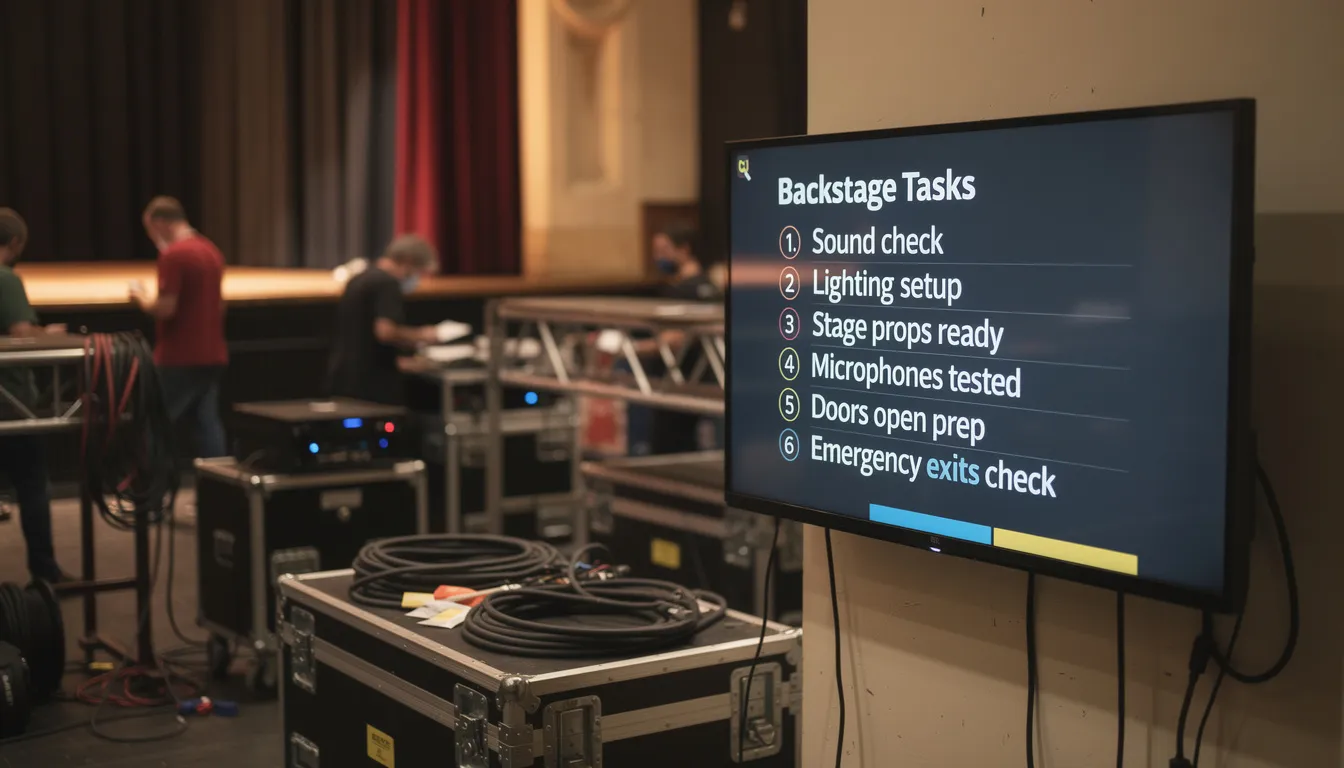
- Backstage Communication: Call times, rehearsal schedules, and production notes update automatically on backstage screens.
- Parallel User Support: Programmers, production teams, and marketing staff can all contribute data that flows into the signage network without bottlenecks.
Front-of-House & Audience Experience
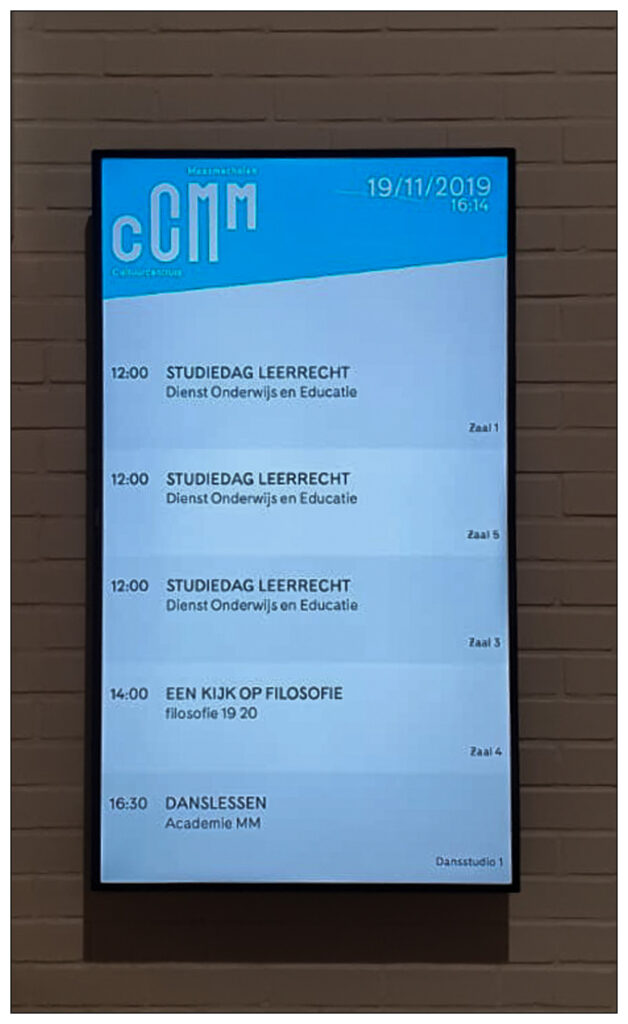
Lobby and entrance displays serve as the primary communication channel between your venue and visitors. With SignageTube Live connected to Yesplan, these screens can show live-updated showtimes, delays, room changes, and special messages without requiring staff intervention at the screen level.
Imagine a performance scheduled for 18 October 2026 at 20:00. Technical issues during sound check delay the start time by fifteen minutes. The production team updates the start time in Yesplan, and within the next refresh interval, foyer screens display the adjusted time along with an apology message. Visitors arriving early see accurate information. Box office staff do not need to field questions about discrepancies between printed tickets and lobby displays.
Dynamic wayfinding becomes practical in venues with multiple spaces. Screens can display directional arrows and room names based on which events are active at any given time. During a busy Saturday with simultaneous performances in the Main Hall, Black Box, and Rehearsal Room 3, wayfinding displays adjust their content to guide audiences to the correct location. When one event ends and another begins, the arrows update accordingly.
Accessibility information can also be automated. If Yesplan contains custom fields indicating that a specific performance includes subtitles, audio description, or hearing loop support, SignageTube templates can include placeholders that render this information on screen. Audiences with accessibility needs see relevant messages without requiring separate signage management.
Backstage, Production and Technical Teams
Production schedules are rarely static. Load-in times shift, sound checks run long, and last-minute changes cascade through the day. SignageTube Live addresses this reality by providing screens that automatically refresh with current Yesplan data.
A multi-space venue can deploy screens at the stage door, loading dock, wardrobe department, and control room. Each screen displays relevant Yesplan data filtered by location or department. The loading dock screen shows load-in and load-out times for the day. The wardrobe screen displays costume call timings. The control room screen presents the full technical schedule. All of these views pull from the same Yesplan source but present information tailored to each team.
For stage managers and technicians, this eliminates the cycle of printing, distributing, and reprinting call sheets whenever something changes. If a director adds an extra run-through at 14:00, updating Yesplan is sufficient. Screens across the building reflect the change within minutes.
Technical warnings and safety briefings can be highlighted using color-coded layouts defined in PowerPoint templates. A template might display routine schedule items in standard formatting while rendering safety notes or urgent changes in red. This visual distinction helps crews identify critical information at a glance without reading every line on the screen.
Using SignageTube Live + Yesplan for Festivals & Large-Scale Events
Multi-day festivals, city events, and campus-style cultural gatherings present unique challenges for communication. Audiences move between stages, schedules shift due to artist availability or weather, and information must reach people across large physical areas. SignageTube Live combined with Yesplan addresses these challenges through centralized data management and distributed screen networks. A comprehensive range of services is available to support organizations such as festivals, theatres, music venues, and local councils in deploying and managing digital signage solutions efficiently.
Yesplan’s event grid can manage multiple days and stages, tracking performance times, artist names, and locations. This data feeds a network of festival screens positioned at entrances, information points, food courts, artist villages, and VIP areas. Each screen can display relevant content based on its location and the current time of day.
Consider a summer festival running from 12 to 15 July across four outdoor stages and two indoor venues. SignageTube Live can show “Now Playing” and “Next Up” information per stage, updated continuously as performances begin and end, using real-time Yesplan time schedule data to keep every listing accurate. Visitors at the main entrance see an overview of all stages. Visitors near Stage 3 see detailed information specific to that location.
Programme changes happen at festivals. An artist cancels, a set time shifts due to weather, or an emergency requires evacuating a particular area. In traditional signage setups, these changes require manual updates across potentially hundreds of screens. With SignageTube Live, production staff update Yesplan once, and every connected screen reflects the change within the next refresh cycle.
Wayfinding, Crowd Flow and Safety Messaging
Large-scale events demand clear wayfinding and the ability to communicate safety information rapidly. SignageTube Live templates can use Yesplan location data and time slots to generate directional content that adapts throughout the event.
During different time blocks, screens can display arrows pointing toward active stages, colour-coded area maps, and estimated walking times. As the programme progresses and audience focus shifts between stages, wayfinding content adjusts automatically based on what is happening at each moment.
Safety messaging requires special consideration. Screens can display scheduled announcements about evacuation routes, first-aid points, prohibited items, and emergency contact numbers. More importantly, emergency content can override regular programming when activated.
Imagine a thunderstorm forcing the closure of an outdoor stage. Production staff update the event status in Yesplan, marking the outdoor performances as cancelled or relocated. An emergency layout automatically activates on screens in affected zones, directing audiences to indoor areas or exits. This happens without someone running to each screen to change content manually.
Sponsors, Partners and Merchandising Screens
Sponsor visibility often depends on specific events, stages, or time blocks. SignageTube Live can tie sponsor content to Yesplan data, ensuring that commercial messages appear when and where they are most relevant.
When a sponsored stage is active, screens in that area can display the corresponding sponsor loop with increased rotation. A headline sponsor supporting a Saturday headliner slot might see their logo displayed more prominently during that specific performance window, all triggered automatically by Yesplan’s programme fields.
Yesplan categories can also drive commercial messaging. Events tagged as “family show” might trigger promotion of children’s merchandise or family meal deals. Events tagged as “jazz” might trigger bar specials or album promotions. Digital signage can also display up-to-date price information for products or special offers, making it easy for attendees to see current deals and enhancing the merchandising experience. This level of automation ensures that commercial content remains relevant to the audience present at any given moment.
Commercial & Corporate Event Spaces
Conference centres, trade fair venues, corporate campuses, and hotel meeting complexes operate on a different rhythm than performing arts venues, but face similar communication challenges. Rooms are booked back-to-back, sessions shift at short notice, and attendees need accurate information to navigate their day.
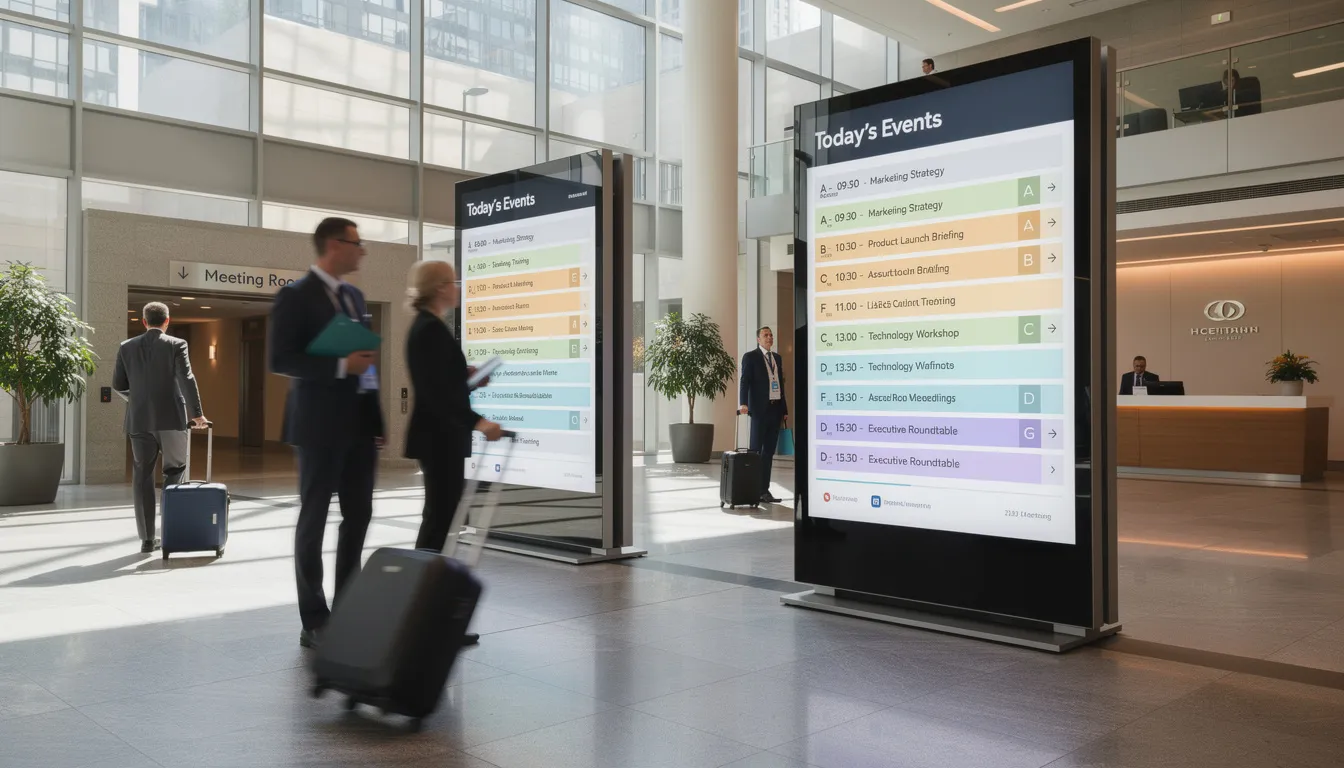
SignageTube Live can use Yesplan’s room bookings to populate digital door signs, lobby directories, and interactive information points. Each screen displays current and upcoming sessions based on room allocation data, automatically updating as the day progresses. Similar PowerPoint digital signage solutions can also be deployed in store environments to promote products, highlight special offers, and enhance the in-store customer experience.
Consider a convention centre hosting a three-day conference in October. Yesplan manages all session bookings, speaker assignments, and room allocations. Attendees see real-time room directories on lobby screens, with session titles, speaker names, and timing information. Door signs outside each room display the current session and what is coming next. If an organizer moves a breakout session from Room 204 to Room 301, updating Yesplan is sufficient. All relevant signage updates within minutes.
This approach reduces the burden on front desk staff and event coordinators. Instead of fielding constant questions about room locations or schedule changes, they can direct attendees to the nearest screen. The information is always current because it comes directly from the planning system that coordinators already maintain.
Corporate Branding and Hybrid Events
Corporate clients typically have specific branding requirements for any communication displayed at their events. SignageTube’s PowerPoint-based template system makes it straightforward to create branded layouts without requiring complex design tools or specialized software skills.
Templates can position company logos in consistent locations while reserving areas for dynamic Yesplan data: event names, session times, room assignments, and organiser information. Marketing teams can upload brand-compliant templates that operations staff then deploy across screens without risk of inconsistent formatting.
Hybrid events introduce additional requirements. Screens can display QR codes linking to live streams, check-in pages, or feedback forms. These links can correspond to specific sessions defined in Yesplan, ensuring that attendees scanning a code in the corridor are directed to the correct virtual resource for their location and timing.
Sports & Specialized Entertainment Venues
Arenas, stadiums, race tracks, and specialized entertainment spaces operate at a different intensity than most venues. Match days involve coordinating thousands of visitors, managing hospitality bookings, and communicating time-sensitive information across large facilities. Yesplan can manage event planning, space allocations, and staffing for these environments. SignageTube Live extends that data to screens throughout the venue.
On a typical match day, entrance screens can display gate information and kick-off times pulled directly from Yesplan. Concourse screens can show different messages based on the current period or half-time status. Hospitality areas can display welcome messages for specific corporate guests alongside event schedules.
Specialized events add complexity. An e-sports tournament might involve dozens of matches across multiple days. An ice show might have matinee and evening performances with different cast rotations. A motorsport weekend might include practice sessions, qualifying rounds, and main races across several days. All of these scenarios involve complex time slots that Yesplan can track and SignageTube Live can display. For example, a SignageTube Live digital signage presentation created in PowerPoint for a sports event can feature vibrant team colors, live score updates, and sponsor logos, and is easily customized to match the event schedule or branding needs.
The key benefit is consistency. When the events team updates match timing in Yesplan, screens across the venue reflect the change. Visitors, staff, and hospitality clients all see the same accurate information.
VIP, Hospitality and Partner Areas
Hospitality lounges and VIP suites require personalized communication that differs from public concourse messaging. SignageTube Live can display tailored welcome messages and schedules based on Yesplan’s guest lists and room allocations.
A corporate suite hosting clients for a specific match might see a welcome screen with the company’s logo and a personalized message. The same screen can display the match schedule, hospitality service timings, and information about meet-and-greet opportunities, all derived from Yesplan data.
Sponsor and partner content can rotate differently in hospitality areas compared to public zones. Premium partners might see exclusive content in their assigned spaces, while general sponsors appear on public concourse screens. SignageTube Live supports this differentiation through screen groups and playlist rules that filter content based on location.
Data Flow, Automation and Content Templates
Understanding what data flows between Yesplan and SignageTube Live helps organizations plan their integration effectively. The typical data set includes:
| Data Field | Source | Usage in Signage |
|---|---|---|
| Event name | Yesplan | Headlines, listings |
| Date | Yesplan | Filtering, scheduling |
| Start/end time | Yesplan | “Now playing”, countdowns |
| Location/room | Yesplan | Wayfinding, door signs |
| Organiser | Yesplan | Corporate branding |
| Category | Yesplan | Content triggering |
| Custom fields | Yesplan | Accessibility, sponsors |
Scheduling logic in SignageTube Live can filter events by various criteria:
-
- Events happening today
-
- Events this week
-
- Events currently active
-
- Events starting within the next hour
This mirrors how the SignageTube Apps – Yesplan Events solution surfaces live programme data. This filtering happens automatically based on Yesplan data, eliminating the need for staff to manually rebuild playlists each day.
The division of responsibilities is clear:
-
- Visual design happens in PowerPoint, where designers control fonts, colours, images, and layout.
-
- Business rules come from Yesplan and SignageTube Live, where administrators define filters, timings, and screen group assignments.
This separation lets creative teams and operations teams work independently without stepping on each other.
For downloadable resources, integration guides, and additional information about SignageTube Live and Yesplan integration, users can visit the official website, including our detailed guide on using PowerPoint for digital signage with best practices.
Live Monitoring and Updates
SignageTube’s live monitoring and real-time update capabilities set a new standard for managing events and digital signage across multiple locations. SignageTube Live empowers organizations in the cultural sector and beyond to stay ahead of the curve, ensuring that every screen displays the most current and relevant information—no matter where in the world it’s located.
Through the intuitive management dashboard, multiple users can access and control digital signage content from any browser, at any time. This flexibility is essential for teams managing events, resources, and communications across different venues or departments. Whether you’re updating a foyer screen in a concert hall, a wayfinding display at a festival, or a meeting room sign in a corporate campus, the system ensures that your data and messages are always accurate and up-to-date.
Live monitoring provides a real-time view of what’s playing on every connected screen, allowing your team to verify content, troubleshoot issues, and introduce new messages or promotions at a moment’s notice. This is especially valuable when circumstances change unexpectedly—such as new COVID-19 restrictions, weather alerts, or last-minute event adjustments. With SignageTube, you can instantly update playlists, schedules, and news tickers to keep employees, customers, and visitors informed and engaged.
The platform’s support for multimedia content—including video, audio, and dynamic news tickers—means you can create engaging presentations using familiar tools like PowerPoint, as discussed in our broader digital signage strategies and use cases. This makes it easy to tailor your digital signage to different audiences and locations, from cultural venues to retail stores, hospitality sites, and educational institutions. The planning software’s playlist management features let you organize and schedule content with precision, ensuring the right messages reach the right screens at the right time.
Security is a top priority for organizations managing sensitive data, such as event finances or confidential schedules. SignageTube offers robust access controls and secure data storage, giving you peace of mind as you manage your digital signage network. Only authorized users can access and update content, and all data is protected within the system.
A dedicated support team is always available to assist with setup, onboarding, and ongoing management, helping your organization maximize the value of your digital signage investment. Whether you’re a small business or a large enterprise, SignageTube’s tailored features and resources make it easy to scale your operations, connect multiple locations, and deliver a unified experience across every screen.
By leveraging live monitoring and real-time updates, organizations can manage events more efficiently, collaborate seamlessly across teams, and provide exceptional experiences for employees, customers, and visitors. SignageTube’s technology ensures you’re always in control, ready to respond to any situation, and equipped with the tools you need to organize, schedule, and display content that matters—making it the ideal planning software for the future of digital signage management.
Implementation Steps: From Yesplan Account to Live Signage Network
A typical integration project follows a structured path from initial planning to live deployment. Understanding these phases helps organizations allocate resources and set realistic timelines.
Discovery Phase
-
- Map your existing Yesplan setup: venues, rooms, event types, categories, and custom fields relevant to signage (e.g., accessibility, sponsors, age ratings).
-
- Define which data should appear on which screens across your network.
Template Design
-
- Use SignageTube’s PowerPoint-based approach to create or adapt templates according to brand guidelines and venue requirements.
-
- Develop specific templates for foyer screens, backstage schedules, door signs, etc.
-
- Most organizations create between four and ten template variants.
Configuration
-
- Establish the data connection to Yesplan, typically using Yesplan’s API with appropriate access credentials and security settings.
-
- Define refresh intervals for how frequently SignageTube Live checks for updated data.
-
- Configure screen groups, assigning specific players to venues, rooms, or content types.
Testing
-
- Validate the integration with real upcoming events.
-
- Select a busy operational day to verify data flows and displays.
-
- Adjust template layouts or data filtering rules as needed.
Staff Training
-
- Emphasize the core workflow: update only in Yesplan, and signage follows automatically.
-
- Train front-of-house teams to trust the screens as the single source of truth.
-
- Educate production staff on which Yesplan fields affect signage and how quickly changes appear.
-
- Show marketing teams how custom fields and categories trigger different content displays.
Why Use SignageTube for Yesplan-Based Venues?
SignageTube brings specific advantages to venues already using Yesplan for event management. The on-premises architecture means no reliance on cloud servers. Players connect through the local network or secure internet connections to receive content and updates, with SignageTube’s management dashboard accessible from any browser within the organization’s infrastructure.
The PowerPoint-native content creation approach lowers barriers for staff who need to create or modify templates. Most organizations already have employees comfortable with PowerPoint, and they can follow a complete PowerPoint digital signage workflow to move from slides to live screens. They can design professional signage layouts without learning specialized software. Support for both Windows and Android players provides flexibility in hardware selection, from inexpensive media players to professional-grade displays with built-in computing.
Operationally, the integration reduces workload significantly. Organizations that previously maintained separate schedules in their planning software and their signage system can eliminate that duplication by adopting a real-time digital signage setup where data flows automatically. Yesplan becomes the single environment for managing events, resources, and timing. Staff hours previously spent copying and pasting schedule information into signage tools become available for other tasks.
Reliability features matter for live events. SignageTube provides live monitoring with thumbnail previews of what each screen displays. Heartbeat checks confirm player status. Offline caching ensures that screens continue displaying content even if network connectivity is briefly interrupted. Reports provide proof of play for sponsors and stakeholders who need documentation of what appeared on screen and when.
SignageTube serves as a specialist partner for venues using Yesplan across Europe, the UK, and North America. Experience with cultural venues, festivals, corporate event spaces, and sports environments informs both product development and implementation support, and organizations that require remote access or distributed teams can complement this with a digital signage solution where appropriate.
Getting Started and Next Steps
The path from considering this integration to operating a real-time digital signage network is shorter than many organizations expect. Starting with a SignageTube free trial lets you experiment with PowerPoint-based templates and understand how the system works. You can create sample layouts and see how they render on test players before committing to full deployment.
For organizations specifically interested in the Yesplan integration, booking a consultation provides a walkthrough tailored to your venue or festival programme. The support team can demonstrate how your existing Yesplan data would appear on signage, identify which templates suit your needs, and outline implementation timelines based on your upcoming season.
Existing Yesplan customers often have API access already configured for other integrations. This existing setup can accelerate SignageTube deployment by reducing configuration time. Contact SignageTube to discover how quickly you can move from planning to live operation.
Whether you operate a cultural venue preparing for a 2026-2027 season, a festival planning summer programming, a corporate event space booking conferences, or a sports arena scheduling matches and hospitality, the combination of Yesplan and SignageTube Live offers a foundation for automated, accurate communication across every screen in your network, backed by our broader digital signage software resources. Reach out for a tailored proposal that addresses your specific environment and requirements.

- SignageTube Starter – content signage on any TV
- SignageTube Enterprise – live data on your screens
- Digital signage software – how to choose, and what matters
- Templates – 120+ ready-made designs
- Pricing – simple per-screen plans