 SignageTube
Multiple Features you need to Look for in a Digital Signage Player Before Buying
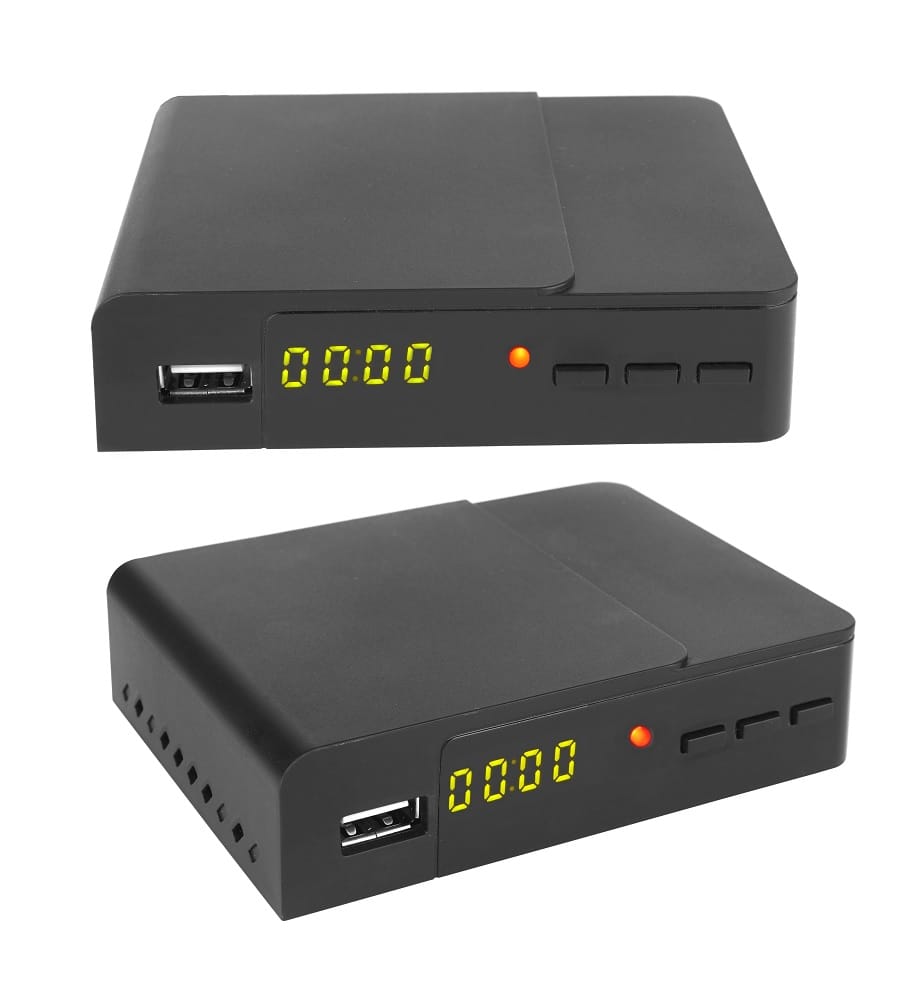
What is a Digital Signage Player?
Summary Box: What is a Digital Signage Player?
A digital signage player is a standalone hardware device designed to display digital content, such as advertisements and menu boards. It acts as the bridge between a content management system (CMS) and the display screen, and is essential for controlling the digital content shown on monitors. Key features include remote content management, scheduling, high-quality playback, and centralized control.
A digital signage player is a standalone hardware device designed to display digital content, such as advertisements and menu boards, and acts as the bridge between a content management system (CMS) and the display screen. Understanding digital signage players is crucial for business owners, IT managers, and marketers who want to deliver effective digital communication, streamline content management, and maximize the impact of their visual messaging. This article will cover the definition of digital signage players, their essential features, the different types available, maintenance best practices, and how to select the right player for your business needs.
A digital signage player is only as good as the features behind it. This article breaks down the essential capabilities that make a signage player reliable, from smooth video playback and stable connectivity to remote management and automatic startup. Learn how SignageTube combines these features into a powerful, cloud‑managed player that keeps your screens running flawlessly. With the right feature set, your signage becomes more consistent, more professional, and easier to manage across any environment.
Using a digital signage player in addition to the digital signage software is beneficial for almost each and every business. Starting from healthcare, entertainment, education to the finance industry, everyone can reap multiple benefits by using digital signage players.
But before purchasing a digital signage display, it is important to be aware of the basic digital signage feature that should be available in any digital signage software. There are various kinds of digital signage players available in the market and with multiple variations in their features and functionality.
But there are some essential points or features that should be easily accessible in any digital signage player, and this article will provide you with the necessary information before you choose to buy or subscribe to digital signage software. The necessary features mentioned below will let you get the most out of any digital signage software. So without further ado, let us begin:
What is a Digital Signage Player: All the Necessary Features You Should Look For
Introduction to Digital Signage
Digital signage is revolutionizing the way businesses communicate, advertise, and engage with their audiences. At its core, digital signage refers to the use of electronic display screens—such as LED panels, LCD monitors, or expansive video walls—to present dynamic digital content. This content is managed and distributed through specialized digital signage software, which allows organizations to schedule, update, and control what appears on their digital displays, forming the foundation of modern digital signage for businesses.
A digital signage player acts as the bridge between your content management system (CMS) and the display screen, controlling the digital content shown on monitors. This physical device stores, processes, and renders digital content, ensuring that everything from promotional videos to real-time announcements is delivered seamlessly to your display screens. Choosing the right digital signage player is crucial for reliable content delivery, high-quality visuals, and smooth operation across your digital signage system. Whether you’re managing a single screen or a network of video walls, the right signage player ensures your digital content reaches your audience effectively and efficiently.
The Digital Signage Player must be Easy to Use
The first and foremost feature of using digital signage software is that the software must be user friendly. A digital signage player must be simple and easy to set up for personal or company usage. Digital signage players come in various forms, including compact plug-and-play devices, advanced media boxes, and traditional computers, each suited for different deployment scenarios and content types. Selecting the right physical device is important for ensuring ease of use and suitability for your business needs. The using process should be so simple that multiple stakeholders or employees of the organization or company can easily deal with the system on their own and can easily learn how to update their display.
If the software is hard to get a grasp of and people cannot easily handle the things, then if the person goes away for a few days, things may not work out very well for the company. Furthermore, the software should be easy to train several employees on how to manage their displays as well as edit, create and publish any content for their target audience.
Essential Features of a Digital Signage Player
When evaluating digital signage players, look for these key features:
-
Remote Content Management: Update, edit, and schedule content from anywhere in the world via the internet.
-
Scheduling: Set specific times for content to play, ensuring timely and relevant messaging.
-
High-Quality Playback: Support for HD and 4K video, smooth rendering of images, videos, and presentations.
-
Centralized Control: Manage multiple screens and locations from a single dashboard.
-
Multi-User Access: Allow multiple users to access and manage content, with role-based permissions.
-
Multiple Layouts: Choose from various display layouts and customize screens for unique content.
-
Support for Various Media Formats: Play videos, presentations, images, HTML5, and live data feeds.
-
Integration with Specific Applications: Add apps like weather, time, or social media feeds.
-
Routine Software Updates: Receive regular updates for security, compatibility, and new features.
-
Stable Connectivity: Reliable Wi-Fi or Ethernet options for seamless content delivery.
-
Local Content Storage: Ensure uninterrupted playback even if the internet connection is lost.
-
Robust Processing Power: Sufficient memory and CPU for smooth operation and multimedia rendering.
Allocate or Schedule your Content from Anywhere in the World
Another major deciding factor for choosing your digital signage player is that the software can let the company access, edit, remove, and publish their content from anywhere in the world. Digital signage players typically connect to the internet via Wi-Fi or Ethernet, enabling remote management, real-time content updates, and scheduling adjustments. Reliable internet connectivity and various connectivity options, such as a wired Ethernet connection or Wi-Fi, are important for seamless content delivery and delivering content to display screens, especially when powering real-time digital signage experiences. Many digital signage players can also store content locally, ensuring uninterrupted playback even if the internet connection is temporarily lost. Additionally, players can connect to a local network for content updates and management within a business environment. This special feature is particularly beneficial for companies that have offices in multiple locations. With these features, you can easily display your content at multiple locations.
A sense of cohesion is added to the company when this feature is being used through digital signage display. Often while expanding their branches in multiple locations, these companies lose out their cohesion sense. Also, keep your content updated in the cloud so that people from other locations can easily manage and update the contents whenever required.
Secured Access to Multiple Users
If multiple users can access the digital signage display content, then it becomes easier for the companies to handle their content. This way, the digital signage player using the company can distribute the content responsibilities to different employees with respect to their designation.
For example, in an organization, one employee may be responsible for updating content such as revenue, profit margin, etc. on the other, someone else may be responsible for updating things like memes, funny videos, motivational quotes, etc. Only the person responsible for posting and updating all the content can be overbearing, through distributing the workload, people can make the most out of the digital signage software and be productive at the same.
This feature will give access to the company display dashboard from multiple devices and locations so people can access the software however and whenever they like. The multi-user feature of the software also becomes effective when the content of the display needs to be suddenly edited or removed. As another example, if a restaurant is no longer serving a dish, any employee of the restaurant can access the digital display player and make the necessary changes required (which in this case is removing the item that is not being served). Things can be a lot easier if multiple employees can do it.
The Display should have Multiple Layouts
The digital signage software company should provide their customers with multiple layouts in their digital signage display software so that they can easily choose the ideal display layout and edit the screen to create their own unique content. Digital signage content can include various media files, such as images, videos, and interactive elements, which enhance viewer engagement and the overall user experience. A content management system (CMS) is essential for organizing, scheduling, and distributing digital signage content across different types of digital signage and multiple screens, particularly when leveraging cloud-based digital signage software. Multi screen support is a key feature for businesses that need to display content across several screens simultaneously or in a synchronized manner. Digital signage solutions are versatile enough to efficiently support scenarios with just one screen or multiple screens, highlighting the scalability and flexibility of the system. To ensure smooth performance, digital signage players should have robust processing power and memory capacity to efficiently render and display multimedia content without lag. High-quality playback supports various types of digital signage content, including 4K/HD video, images, HTML5, and live data feeds. This way, the marketing department of the company can come up with multiple ideas that the software can support.
The Digital Signage Player should support both Videos and Presentations
The best and effective way to keep your audience engaged is to have a mix of presentations and videos in your advertising content. It has already been proven that in marketing, using videos and presentations is a great idea. So while posting your digital signage display content, you don’t want to limit the choice of the content you can post. Therefore, while you are looking for a digital signage media player, keep the video integration feature in your mind. A reliable digital signage media player should support a wide range of media formats and be compatible with different digital signage screens and digital displays to ensure seamless playback. With a presentation you can easily mix multiple slides with texts and images.
When comparing standalone media players and smart TVs for digital signage, it’s important to note that standalone digital signage players typically offer better performance and flexibility than smart TVs with built-in system on chip (SoC) solutions. Standalone media players provide superior processing power and graphics capabilities, resulting in smoother content playback, especially for demanding video, animation, or interactive content. In contrast, smart TVs may lack the robustness and durability required for continuous commercial use, making standalone players a more reliable choice for professional digital signage setups. Commercial displays designed specifically for digital signage are built for 24/7 operation and often include advanced remote management features, which are generally superior to those found in consumer-grade smart TVs. Additionally, external media players can further enhance content playback quality, offering even greater processing power, graphics, and memory compared to SoC solutions.
Support for HD resolution and even higher resolutions, such as 4K video at 60 frames per second, is essential for delivering sharp and detailed visuals on your digital signage displays and maximizing the impact of digital advertising screens. Choosing the right digital signage media player ensures optimal playback quality on your digital signage screen, allowing your content to look its best in any environment.
Integration of Specific Applications
Apart from the video and image integration feature, you would want to look for a bit more options to go with. Integration of specific apps is also a feature you should look for while dealing with digital signage players. For example, you can integrate a weather forecast app through which people can also know about the weather situation of the place they are currently in. You can also include time apps or let people know about what is going on in the company’s social media handle. Digital signage players typically run on operating systems such as Windows, Android, and Linux, each providing different advantages in terms of compatibility, performance, and user experience, especially when connected to cloud-based SignageTube digital signage. Choosing a player with the right operating system is important for supporting the specific applications your business needs.
Routine Software Updates
Before purchasing a digital signage player, you need to find out if the software company sends routine software updates, as this is a clear signal of a mature solution and aligns with the broader reasons to invest in digital signage. After making a significant amount of investment, you don’t want the software to be outdated or not eligible for further usage. The updates will also keep on informing you how the display content is performing at certain periods of time.
There are plenty of digital signage players available in the market, and they have their own unique features or USP, but as a consumer, it is up to you to choose the right one. So that you will not have to worry about paying additional money to get access to other attributes that are not included in the software you are currently using, as the customer of digital signage display software, you and your company deserve the best and the latest features of the software can be more beneficial for you.
Setting Up a Digital Signage Player
Getting started with a digital signage player is a straightforward process designed for efficiency and scalability. Begin by connecting your signage player to the digital signage display using an HDMI cable, ensuring a secure and high-quality video connection. Next, power on the player and establish an internet connection—either through a wired Ethernet connection for maximum reliability or Wi-Fi for flexible placement.
Once connected, install your chosen digital signage software and configure the content management system (CMS). The CMS acts as your central hub, allowing you to upload, organize, and schedule digital content for playback. With the right digital signage player and software, you can easily manage multiple screens, incorporate interactive elements, and schedule high-definition content to play at optimal times, even when using PowerPoint-based digital signage as your primary content format. Remote management capabilities mean you can update content, monitor performance, and troubleshoot issues from anywhere, making it simple to keep your digital sign network running smoothly and efficiently.
Digital Signage Player Options
When selecting the right digital signage player for your business, it’s important to understand the different types available and how they align with your operational needs. The most common options include Android-based players, Chrome OS devices, and Windows-powered signage players. Android digital signage players are favored for their flexibility, cost-effectiveness, and compatibility with a wide range of digital signage applications. They are ideal for businesses seeking a scalable solution with robust app support and straightforward remote management capabilities.
Chrome-based signage players, on the other hand, are known for their simplicity and seamless integration with cloud-based digital signage software. These players are particularly well-suited for organizations that prioritize easy deployment and centralized control across multiple locations. Windows digital signage players offer a familiar operating system environment, making them a strong choice for businesses that require higher processing power or need to run complex, interactive content.
When evaluating which signage player to deploy, consider the type of digital content you plan to display, the processing power required for smooth content playback, and the level of remote management you need for operational efficiency. Each type of digital signage player brings unique strengths, so matching the player to your business objectives and digital signage setup is key to a successful deployment.
Digital Signage Player Maintenance
Maintaining your digital signage player is essential for ensuring consistent performance and extending the lifespan of your digital signage system. Regularly updating your digital signage software and the player’s firmware helps protect against security vulnerabilities and ensures compatibility with new features. It’s also important to keep the player and display screens clean and free from dust, which can affect both performance and image quality.
Monitoring your internet connection is another key aspect of maintenance, as a stable connection is vital for content updates and remote management. Additionally, keep an eye on the player’s operating temperature—overheating can lead to hardware failures and unexpected downtime. By following these simple maintenance steps, you can minimize disruptions, safeguard your investment, and ensure your signage player continues to deliver engaging digital content reliably.
Digital Signage Applications and Industries
Digital signage has become an essential tool across a wide range of industries, transforming the way organizations communicate and engage with their audiences. In retail stores, digital signage is used to showcase product promotions, highlight special offers, and deliver dynamic advertisements that capture customer attention. Digital menu boards have revolutionized the food service industry, allowing restaurants and cafes to update menus in real time and display high-definition content that entices customers, especially when using cloud-based menu board TV solutions. These solutions are specifically designed for commercial environments such as retail stores, restaurants, manufacturing facilities, hospitals, airports, and corporate offices, where durability, functionality, and environmental considerations are critical.
In the hospitality sector, digital signage enhances the guest experience with personalized greetings, wayfinding, and information about amenities or events; similarly, cafes and coffee shops benefit from digital coffee shop menu boards that modernize ordering and promotions. Educational institutions leverage digital signage to broadcast campus alerts, event schedules, and important announcements, ensuring timely communication with students and staff. Corporate offices use digital signage systems to share internal communications, display performance dashboards, and reinforce company culture across multiple displays and locations.
When deploying digital signage in outdoor environments, it is important to consider the impact of weather and harsh conditions on the durability and lifespan of digital signage media players. Specialized devices or protective measures are often required to ensure reliable operation and longevity in these settings.
The digital signage industry continues to evolve, with new applications such as interactive kiosks, video walls, and real-time data integration becoming increasingly common, building on core concepts of what digital signage is and how it works. Whether you’re managing digital content in a sports arena, healthcare facility, or multi-site corporate network, the right digital signage solution can help you achieve your business objectives and deliver engaging visual content to your audience.
Future of Digital Signage
The digital signage industry is on the cusp of transformative change, driven by rapid advancements in technology. In the near future, digital signage systems will increasingly leverage artificial intelligence, augmented reality, and the Internet of Things (IoT) to create more interactive and personalized experiences. Imagine digital displays that adapt content in real time based on audience demographics or environmental conditions, or signage that integrates seamlessly with mobile devices for enhanced engagement.
Cloud-based solutions are also set to play a major role, simplifying digital signage setup, management, and maintenance for businesses of all sizes. These innovations will enable organizations to harness real-time data, automate content delivery, and scale their digital signage networks with ease. As digital signage becomes more accessible and versatile, its applications will continue to expand across retail, hospitality, transportation, and beyond—making it an indispensable tool for modern communication and marketing strategies.
Digital Signage Software Comparison and Selection
Choosing the right digital signage software is a critical step in building an effective digital signage system. With a variety of options available, it’s important to consider factors such as the types of media formats supported, the level of remote management required, and the scalability of the solution for large-scale installations. Leading digital signage software platforms like NoviSign, Scala, and SignageOS each offer a unique set of advanced features designed to meet diverse business needs.
NoviSign is a cloud-based digital signage software known for its user-friendly interface, support for multiple media formats, and powerful scheduling tools. It enables organizations to remotely manage content across multiple screens and locations, making it ideal for businesses with distributed operations. Scala offers a comprehensive content management system (CMS) with advanced features for content creation, scheduling, and remote monitoring, supporting a wide range of digital signage player devices and operating systems.
SignageOS stands out for its compatibility with various digital signage players and its robust remote management capabilities, allowing businesses to monitor and update content in real time. When comparing digital signage software, look for solutions that offer seamless integration with your existing hardware, support for high-definition content, and reliable software updates to ensure your digital signage deployment remains secure and effective. By carefully evaluating your requirements and the key features of each platform, you can select the right digital signage software to power your visual communications strategy.
Conclusion
In summary, a digital signage player is the backbone of any effective digital signage system, ensuring that high-quality digital content is delivered seamlessly to your display screens. By selecting the right digital signage player and software, businesses can benefit from reliable content delivery, robust remote management capabilities, and improved operational efficiency. As the digital signage industry evolves, staying informed about the latest trends and technologies is essential for achieving your business objectives and maximizing the impact of your visual communications.
Whether your goal is to boost customer engagement, streamline internal communications, or enhance brand visibility, investing in a dependable digital signage player and software is a smart move. With the right tools in place, you can unlock the full potential of digital signage and drive your business forward in today’s competitive landscape.
- SignageTube Starter – content signage on any TV
- SignageTube Enterprise – live data on your screens
- Digital signage software – how to choose, and what matters
- Templates – 120+ ready-made designs
- Pricing – simple per-screen plans