
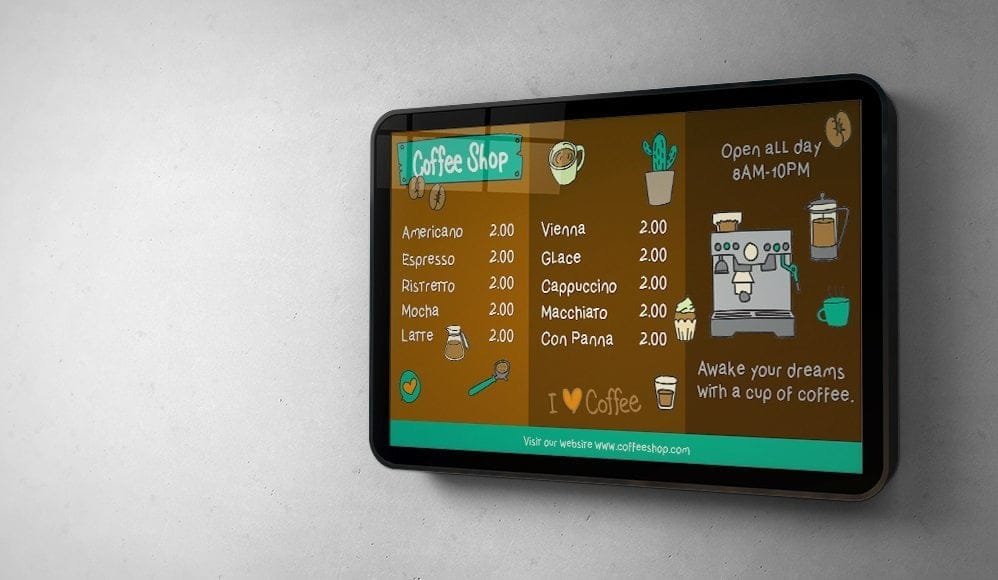
This article shows how to create appealing menu boards in PowerPoint and turn them into digital signage with SignageTube. This guide is for cafe owners, managers, and staff looking to create an effective and visually appealing price list. We cover both pricing strategy and step-by-step menu design using PowerPoint and digital signage tools. A well‑designed price list can make your café look more professional and help customers choose faster. A visually appealing price list allows customers to understand your café’s offerings at a glance, making a strong first impression. Creativity is essential for designing personalized and attractive price lists that reflect your café’s personality and draw in customers. There are many things—such as location, target audience, and brand identity—that influence how you set up your pricing strategy.
Benefits of Using Cafe Price List Templates
Cafe price list templates can help create visually appealing and effective price lists that attract customers. Customizable templates allow you to blend style and functionality to captivate customers, and can be easily customized with logos, colors, and menu items to match your cafe’s branding. Using a well-designed cafe price list can enhance your cafe’s brand identity and improve customer engagement, while templates can save time and money by simplifying the design process and eliminating the need for professional design services.
Introduction to Cafe Pricing
Creating an effective price list is at the heart of every successful café. A thoughtfully designed price list template not only showcases your menu items but also sets the tone for your brand, making a lasting impression on customers. With free price list templates, you can easily create a clean and modern menu that highlights your café’s offerings and services in a professional way. These templates provide a solid foundation, allowing you to present your menu in a style that reflects your unique brand and atmosphere.
By customizing a price list template, you can ensure your menu is easy to navigate, helping customers quickly find the items they want. A well-organized price list communicates value at a glance, making it simple for customers to compare options and make informed choices. Whether you’re introducing new products, updating seasonal specials, or simply refreshing your look, using templates makes the process efficient and effective. Ultimately, a professional and visually appealing price list not only enhances your café’s image but also improves the overall customer experience, encouraging repeat visits and positive word-of-mouth.
Transition: Now that you understand the importance of a well-designed price list and the benefits of using templates, let’s explore how your menu can reflect your brand identity and influence customer decisions.
Brand Identity and Menu Design
The café’s menu should reflect its brand identity through product selection and design elements. Menu design is not just a list of products; it guides purchasing decisions and reflects the brand’s character. Product selection on the menu should ensure sustainable profitability and reinforce the café’s unique style and atmosphere. Thoughtful design choices in your menu provide an implicit answer to customers’ questions about what your café offers and the experience they can expect.
Transition: With your brand identity in mind, the next step is to define your menu items and pricing strategy.
1. Define Your Menu Items and Pricing
Before diving into PowerPoint, start by making a careful selection of the menu items you offer and their respective prices, as a curated menu can strongly influence your café’s brand identity and profitability. Just like in restaurants, menu presentation and pricing strategies—such as the use of currency symbols and pricing formats—can influence customer perceptions and behaviors in both settings. It’s important to find the products that best represent your café’s brand and appeal to your target customers.
Core Offerings
Include a variety of beverages, pastries, sandwiches, and any other specialties your café offers. Core coffee & espresso offerings typically include:
- Espresso
- Americano
- Latte
- Cappuccino
- Macchiato
- Cortado
- Cold Brew
Signature Drinks
Signature drinks—unique, branded beverages such as Seasonal lattes and Lavender Honey Cream Cold Brew (these allow for higher pricing)—can be featured to set your café apart and increase perceived value.
Descriptive Language
When listing menu items, use descriptive language (words that increase perceived value, e.g., “House-made Tarragon Chicken Salad on Fresh Sourdough” instead of “Chicken Salad Sandwich”) to make your offerings more appealing.
Limiting Choices
To reduce decision fatigue (the mental exhaustion caused by too many choices), limit selections in each menu category to 7–12 items.
Pricing Methods
When setting prices, consider:
- Value-Based Pricing: Pricing based on the customer’s perceived value of the experience rather than just cost.
- Cost-Plus Pricing: Calculating the exact cost of ingredients per cup and multiplying by a markup factor (often 3x to 5x) to determine the base price.
Menu Engineering
Effective menu engineering should categorize items into:
- Stars: High popularity, high profit
- Plow Horses: High popularity, low profit
- Puzzles: Low popularity, high profit
- Dogs: Low popularity, low profit
This approach helps you optimize your menu for profitability and customer satisfaction.
Transition: With your menu items and pricing defined, the next step is to develop a pricing strategy that appeals to your target audience and maximizes your café’s profitability.
2. Pricing Strategies for Cafes
Developing the right pricing strategy is essential for any café aiming to attract a diverse customer base and maximize profitability. With a thoughtful approach, you can create a price list that not only appeals to your customers but also reflects your café’s unique brand and offerings. One effective method is to use a tiered pricing system, where menu items are grouped into different price categories. This allows you to offer affordable options for budget-conscious customers while also showcasing premium items for those seeking something special.
Incorporating pricing psychology can further enhance your menu’s appeal. Techniques include:
- Anchoring: Presenting a high-priced item first to make other options seem more affordable.
- Charm Pricing: Ending prices with .99 to subtly influence purchasing decisions.
By using a menu maker and free templates, you can easily customize your price list to highlight these strategies, ensuring your menu is both effective and visually engaging.
Digital tools make it simple to update and adjust your pricing as needed, allowing your café to stay competitive and responsive to customer preferences. Whether you’re introducing new menu items or running limited-time promotions, leveraging templates and menu makers helps you create a price list that is always current and aligned with your business goals. Ultimately, a well-crafted pricing strategy, presented through a professional and customizable menu, will help your café stand out and drive customer satisfaction.
Transition: With your pricing strategy in place, you can now begin optimizing your menu for sales before moving on to the step-by-step design process in PowerPoint.
Optimizing Your Menu for Sales
Maximizing your café’s sales starts with a menu that’s both attractive and strategically designed. Using a menu maker and free templates, you can create a price list that draws attention to your best offerings and seasonal specials, all while keeping your brand’s style front and center. The key is to strike a balance between offering enough variety to satisfy different tastes and keeping the menu simple enough for customers to make quick decisions, especially when displaying the content on a menu board TV.
Highlighting High-Margin Items
With a price list template, you can easily highlight high-margin items, showcase limited-time promotions, and organize your menu for maximum impact.
Updating Your Menu
Customizing templates is straightforward—just a few clicks allow you to update pricing, add new items, or adjust layouts to reflect your latest offerings. This flexibility not only saves you time and money but also ensures your menu always looks professional and up to date, and pairs well with real-time digital signage if you want live updates on your screens.
Responding to Customer Preferences
Affordable and easy to use, menu makers with drag-and-drop functionality let you experiment with different designs and layouts until you find the perfect fit for your café. By exploring a variety of free templates, you can create a menu that’s effective at capturing attention and guiding customers toward your most profitable items. Quick, one-click updates mean you can respond instantly to changes in inventory or customer preferences, keeping your menu fresh and relevant. In the end, an optimized menu is a powerful tool for boosting sales, enhancing customer satisfaction, and showcasing the unique style and services that set your café apart.
Transition: Now that your menu is strategically optimized, let’s move on to the practical steps of designing your price list using PowerPoint.
3. Launch PowerPoint and Set Up Your Document
To begin designing your price list in PowerPoint, follow these steps:
- Open PowerPoint and create a new blank presentation.
- Set the slide orientation to landscape:
- Go to the “Design” tab.
- Select “Slide Size.”
- Choose “Custom Slide Size.”
- In the dialog box, select “Landscape” and click OK.
Using PowerPoint for digital signage also lets you experiment with different layouts, so you can easily customize or switch between layout styles to best organize your cafe price list.
4. Select a Template or Design Your Own
PowerPoint offers a variety of pre-designed price list templates that can serve as a great starting point for your cafe’s price list. To select or design your template:
- Explore the available options in the “Design” tab.
- Search for PowerPoint presentation templates for digital signage online.
- Choose a clean design to showcase your menu items clearly and give your cafe a professional, organized appearance.
- For a more customized look, use PowerPoint’s tools and features to design your own layout.
- Enhance your price list by customizing borders and backgrounds to add visual appeal and improve organization.
5. Create a Title Slide
The first slide of your price list should include:
- A catchy title, such as “Menu” or “Our Offerings,” to grab attention.
- A larger font size or a different color to make the title stand out.
- Your café logo or other relevant branding elements for recognition.
- Icons to visually represent menu categories or reflect your café’s theme, especially if you plan to turn the presentation into stunning PowerPoint digital signage.
6. Organize Your Menu Items
To organize your menu items:
- Dedicate a slide or a series of slides to showcase your various menu items.
- Include any unique services your café offers, such as catering or delivery.
- Categorize your menu (e.g., “Beverages,” “Food,” “Specials,” “Services”).
- Create separate sections for each category to make it easier for customers to navigate.
- Place the category name at the top of each slide and arrange the items below in a clear and organized manner, similar to how a digital coffee shop menu board presents categories clearly to boost sales.
7. Incorporate Descriptions and Images
For each menu item:
- Add a concise yet enticing description (highlight unique ingredients or preparation methods).
- Use sensory words like aroma and taste to make descriptions more appealing.
- Include high-quality product photos to showcase the items and make the price list visually engaging.
- Place the text and image side by side or align them in a way that best showcases your products, following PowerPoint digital signage best practices for readability and impact.
8. Maintain Consistency
To ensure a professional-looking price list:
- Keep font style, size, and color consistent across all slides.
- Stick to a limited color palette that aligns with your café’s branding.
- Use headings and subheadings to create a hierarchical structure that is easy to read and navigate, just as you would when setting up PowerPoint digital signage for beginners.
9. Organize Pricing Information
When displaying prices:
- Clearly display the corresponding price alongside each menu item.
- Use a consistent format (e.g., placing the price next to or below the menu item).
- Play with different font sizes or colors to highlight the prices, making them easily noticeable.
- Align the prices for a neat and organized appearance so that the menu works effectively when used as PowerPoint digital signage for your business.
10. Add Specials and Promotions
If your café offers specials or promotions:
- Dedicate a slide or a section to highlight them.
- Use eye-catching graphics or bold fonts to draw attention to these offerings.
- Clearly state any discounts or limited-time promotions to entice customers to try them, as highlighting specials and promotions has been shown to increase customer interest and sales.
- This becomes even more effective when you publish your PowerPoint presentations to a TV so updates are instantly visible.
11. Validate and Proofread
After completing your price list:
- Review and validate all the information.
- Ensure that all menu items, descriptions, and prices are accurate.
- Proofread the content for any spelling or grammatical errors.
- Ask a colleague or friend to review the price list to provide feedback and ensure its clarity, following the same careful review you’d apply when finalizing PowerPoint-based digital signage.
12. Implementation and Updates
Rolling out and maintaining your café’s menu and price list has never been easier, thanks to digital solutions and free price list templates. With a professional menu maker, you can create and customize your menu items in just a few clicks, ensuring your offerings always reflect your brand’s unique style and the latest seasonal specials. Cloud-based digital signage platforms allow you to manage multimedia content across multiple screens, making menu updates seamless. Using PowerPoint digital signage for menus can streamline operations and reduce the need for physical menu printing. Live-sync technology also keeps printed menus in sync with digital formats, so your customers always see the latest updates. Digital menus allow you to update prices, add new items, or highlight promotions instantly—saving you both time and money.
Sharing your updated menu with customers is simple, whether it’s displayed on in-café screens, posted to social media, or sent via email. If you use QR menus or digital menu sharing, your digital menus can be shared without trackers or cookies, ensuring privacy and fast loading times for your customers. This flexibility means you can draw attention to new offerings or limited-time deals as soon as they’re available. Plus, with analytics and customer feedback, you can continuously refine your menu and pricing strategy to better meet your customers’ needs and preferences.
By using free templates and a menu maker, you can easily personalize your price list to express your café’s brand and create a memorable experience for every guest. The ability to implement changes with one click ensures your menu is always up to date, professional, and effective at showcasing your offerings. Take advantage of these tools to streamline your menu management, enhance your business’s image, and keep your customers coming back for more.
13. Save and Broadcast
Once you are satisfied with your café’s price list:
- Save the PowerPoint presentation to your desired location.
- Download your price list as a PDF or JPEG file to easily share it with your customers digitally or print it for your café.
With these tools, you can create a pro-level price list in just minutes or even seconds, making the process fast and efficient for any user.
Creating a captivating price list for your café using PowerPoint allows you to effectively showcase your offerings while incorporating your café’s branding. With careful organization, visually appealing design, and clear pricing information, your price list will become a valuable resource for customers and a reflection of your café’s overall ambiance.
Professional entrepreneurs nowadays use televisions to display information, promotions and price lists. Content on televisions can be animated and use popping colors to get more attention. Use a professional digital signage platform like SignageTube to send a PowerPoint presentation that you have created or updated, to any smart TV at any remote location.
Start designing your café’s price list today and enhance your customers’ experience!