Home/Editions/SignageTube Enterprise
SignageTube Enterprise

Full real time data and control of your network

Everything in Professional, plus live data from all your sources, health monitoring and diagnostics, RS232 device control and display access that follows your sites and groups.

Best for: cities and public buildings, plants running on live systems, and organizations with many screens on many sites.
7 day free trial, no credit card Everything in Professional included
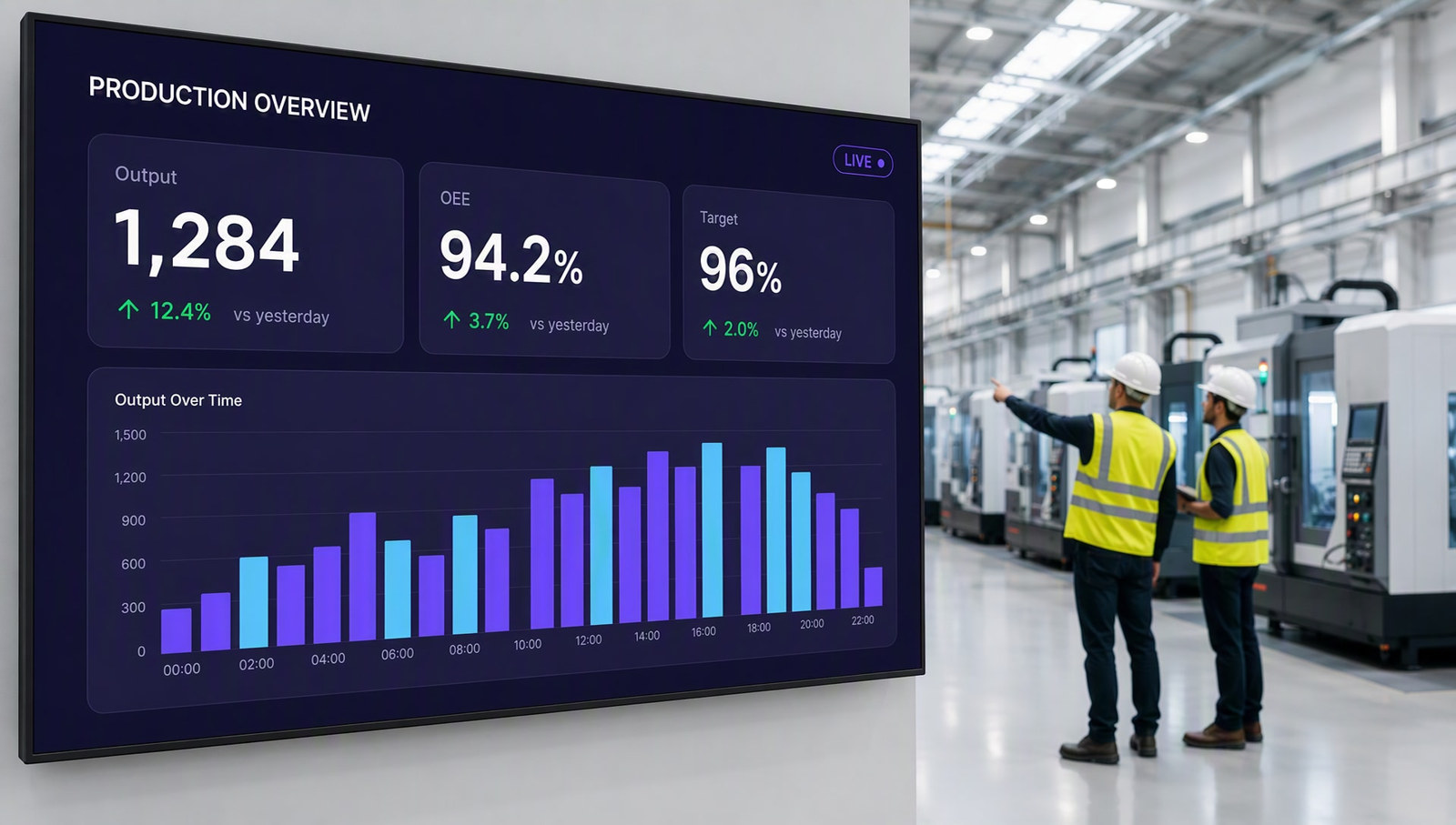
Live KPI dashboard wall powered by real time data

Trusted by teams at world-class organizations

Who it is for

Built for organizations that run many screens on live operational data

Enterprise customers buy in multiples, often by purchase order, and keep their screens running around the clock.

The anchor

Cities and public sector IT

City and government IT offices running information screens across many buildings, managed centrally, with access per department and paperwork that procurement accepts.

Typical screens: public notices, opening hours, service updates, alerts

Live operations

Plants, operations and sales floors

Operations and plant managers who want output, safety days and targets on the wall, live from an Excel file, a SQL database, OPC on the factory floor or the ERP.

Typical screens: production boards, OEE, safety days, sales against target

Scale

Multi site organizations and campuses

Organizations with dozens or hundreds of screens that need to know every player is healthy and to switch displays on and off from one place.

Typical screens: campus news, wayfinding, KPI walls, meeting room schedules

Is it the right edition?

Enterprise fits when the data comes from your systems and the screens run unattended

Choose Enterprise if
  • Numbers on screen should update by themselves, from Excel, databases, Microsoft 365, Salesforce, Oracle or OPC
  • You run many screens across sites and buildings
  • You need to know every player is healthy, without walking to it
  • You want to switch displays on and off with RS232
  • Access should follow your sites and groups automatically
Look at another edition if
  • You need native PowerPoint and Proof of Play, but no live dataProfessional
  • You only show content you update by handStarter
  • Your screens must run on your own servers, without the cloudCustom
On your screens

Every screen on live data, around the clock

Connect a slide to the system that owns the number. When the source changes, every screen changes with it, and the numbers on the wall are the numbers in the system.

  • Output, safety days and targets from an Excel file
  • Production status and OEE straight from OPC
  • Orders, stock and dispatch from SQL or your ERP
  • Sales and pipeline from Salesforce or Dynamics
  • Meetings and rooms from Microsoft 365 or Google Calendar
  • Public notices pushed to every building at once
Real time production dashboard on a factory wall
Everything included

What Enterprise includes

Everything in Professional is included. Enterprise adds every live data source and the tools to run a large network unattended.

Full real time data

  • Excel and text files, SQL and other databases
  • Microsoft Office, SharePoint, Exchange and Outlook
  • Google Workspace, Salesforce, Oracle and Dynamics
  • ODBC, oData and OPC for industry
  • More than 20 sources in total

Run it at scale

  • Health monitoring and a playback diagnostics timeline
  • RS232 device control
  • Dedicated signage screen mode for unattended players
  • Display access assigned through sites and groups

Everything in Professional

  • Native PowerPoint on Windows Players
  • Proof of Play and the Control Room
  • Custom content permissions
  • Playlists, Pages, scheduling, sites and groups

Every feature, edition by edition: compare all editions →

How it works

From your systems to every screen

1

Connect your sources

Point SignageTube at the databases and services that hold your numbers. Our team can help with the first connections.

2

Bind the slides

Link text, tables and charts in PowerPoint to those sources with the SignageTube Live add in.

3

Roll out and monitor

Deploy to every site, assign access by group, and watch player health from one place.

Already on SignageTube

Cities, plants and global groups already run it

Manufacturing, public sector and integrators make up most of our revenue. A few of the organizations on SignageTube:

Stad AalstCity government, BelgiumStadt KarlsruheCity government, GermanyModusLinkSupply chain, NetherlandsNexansManufacturing, USKinetics Noise ControlManufacturing, USWytech IndustriesManufacturing, US

Paying SignageTube accounts, listed by name only. Plans and editions vary by account.

What you need

Windows players and access to your data

We agree the connections with your IT team during the trial or a demo.

  • Windows PCs behind the screens for native PowerPoint and live data
  • A compatible Microsoft PowerPoint installation on each player
  • Read access to the data sources you want on screen
  • For RS232: a compatible player, a serial connection and a display that accepts RS232
What it costs, worked out

€180 a month for 5 screens

5 screens on Enterprise at €36 per screen per month, billed yearly: €2,160 a year. On monthly billing it is €40 per screen, so €200 a month.

Invoicing and purchase orders for larger and public sector accounts.

Pricing

Enterprise pricing, per screen

Start free for 7 days, then pay per screen, monthly or yearly. Purchase orders welcome.

SignageTube Enterprise
Every live source and full control

Everything in Professional, plus full real time data, health monitoring and device control.

  • Everything in Professional, included
  • Full real time data from 20+ sources
  • Health monitoring, RS232 and screen mode
€36 per month, per screenbilled annually, €432 a year

Other editions: Starter · Professional · Custom

FAQ

Questions about Enterprise

Who is Enterprise for?
Organizations that run many screens on live data: city and public sector IT, plants and logistics on live systems, and multi site organizations and campuses.
Which data sources does Enterprise support?
Excel and text files, SQL and other databases, Microsoft Office, Google Workspace, Salesforce, Oracle, ODBC, oData and OPC, plus weather, clocks, timers and RSS. More than 20 in total.
Can we buy by purchase order?
Yes. Invoicing and purchase orders are available for larger and public sector accounts, and several of our city customers buy this way.
Can Enterprise run on our own servers?
Yes, with Custom: any edition, including Enterprise, runs on your own servers, from 5 screens.
What does RS232 control need?
A compatible Player, a serial connection and a device that accepts RS232 commands.
How do we know every player is working?
Health monitoring and the playback diagnostics timeline show the state of every player, so issues are spotted before anyone notices a dark screen.
Is there a free trial?
Yes. Enterprise comes with a 7 day free trial, no credit card needed. For larger rollouts we also run a demo with your team.

Run every screen on live data

Start your free Enterprise trial, or book a demo and we will connect your first data source with you.

SignageTube

Privacy Overview

This website uses cookies so that we can provide you with the best user experience possible. Cookie information is stored in your browser and performs functions such as recognising you when you return to our website and helping our team to understand which sections of the website you find most interesting and useful.