 SignageTube
What is Digital Signage?
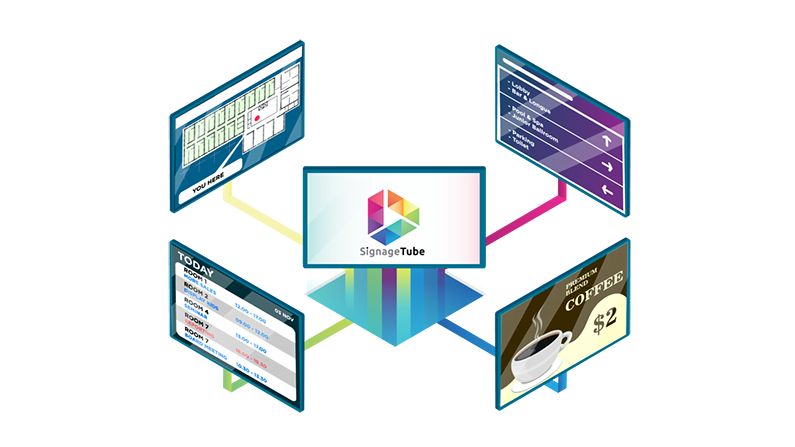
Digital signage is a modern way to share messages on screens—like TVs, monitors, LED displays, or kiosks—using software that lets you create, schedule, and update content remotely.
Instead of printing posters or manually changing signs, digital signage helps teams communicate faster and stay consistent across a single building or many locations. You can display anything from announcements and schedules to promotions, instructions, safety notices, and live dashboards.
In this guide, you’ll get a simple digital signage definition, practical examples, and a clear explanation of how digital signage works—so you can decide if it’s right for your space, audience, and goals.
Digital Signage Definition
Digital signage is a system of digital screens managed by software that delivers scheduled or real-time content to the right displays—so messages can be updated quickly, consistently, and remotely.
In practice, that could look like:
- A lobby screen showing announcements and a visitor welcome message
- A hallway display showing schedules, directions, or alerts
- A dashboard screen showing today’s status, performance, or operational updates
How Digital Signage Works
Digital signage is easiest to understand when you break it into four parts: the screen, the player, the content, and the software that ties everything together.
The Screen
The screen is the visible part of the system: a TV, monitor, LED panel, or touch display. Screens can be mounted on a wall, placed on a stand, installed in a kiosk, or arranged as a video wall.
A key point: digital signage isn’t limited to a specific screen brand. What matters most is that the screen is reliable, bright enough for its environment, and placed where people can comfortably see it.
The Player
A digital signage “player” is the device that outputs your signage content to the screen.
Depending on your setup, the player could be:
- A dedicated small device connected via HDMI
- A built-in player in a smart display
- A compact media device designed to run signage content all day
The player is important because it affects performance (smooth playback), stability (uptime), and how easily you can manage screens across locations.
The Content
Digital signage content can be as simple or as advanced as you need it to be.
Common content types include:
- Slides (like a presentation)
- Images (posters, flyers, announcements)
- Videos (short loops, explainers, brand stories)
- Mixed playlists (a sequence of multiple content types)
- Live data (dashboards, feeds, status updates)
The best digital signage content is designed for quick understanding. People often glance at screens while walking by, so clarity beats complexity.
The Software
Digital signage software is where you control everything.
Typical software capabilities include:
- Uploading and organizing media
- Creating playlists (what plays, in what order)
- Scheduling (what plays at what time/day)
- Assigning content to specific screens or groups
- Remote updates (change content without being on-site)
- Multi-location management (keep messaging consistent across sites)
This is the “control center” of digital signage—especially valuable when you have more than one screen.
Digital Signage Examples
Digital signage is flexible, so the most effective screen content depends on the environment, the audience, and the goal (inform, guide, motivate, promote, or alert).
Here are practical examples that work almost anywhere:
- Announcements and reminders
- Daily schedules, calendars, and event listings
- Wayfinding and directions (where to go next)
- Welcome messages for visitors
- Policy or instruction screens (what to do, how to comply)
- Safety messages and emergency alerts
- Progress updates and status boards (what’s happening right now)
- Live dashboards (KPIs, availability, wait times, production counts)
- Weather, news, or community updates (when relevant)
- Recognition boards (employee/student/team shout-outs)
- Social proof (testimonials, reviews, community highlights)
- “What’s next” screens near entrances or waiting areas
If you want your screens to stay effective long-term, the real secret is rotation and relevance: keep content fresh, and update it when conditions change.
Digital Signage Benefits
Digital signage can be adopted for many reasons, but the strongest benefits usually come down to speed, consistency, and clarity.
- Faster updates: change messages in minutes instead of days
- More consistent communication: align messaging across one or many screens
- Less manual work: reduce printing, posting, and replacing paper signage
- Better timing: schedule messages so the right information appears at the right time
- More flexibility: quickly adjust content for special events, weather, staffing, or operational changes
- Better engagement: motion and visuals can attract attention more effectively than static posters
- Stronger trust: accurate, up-to-date screens reduce confusion and repeated questions
When digital signage is managed well, it becomes a reliable “always-on communication layer” for your organization.
Types of Digital Signage
Digital signage isn’t one fixed format. Most real-world deployments fall into a few common setups.
- Single-screen signage: one display for a single space (simple to start)
- Multi-screen within one site: different screens for different zones or messages
- Multi-location signage: centrally managed screens across multiple buildings or sites
- Interactive signage: kiosks or touch screens for self-service and navigation
- Data-driven signage: screens connected to live sources (dashboards, feeds, alerts)
A helpful rule of thumb: the more screens and locations you have, the more important strong scheduling and remote management becomes.
What You Need To Get Started
You can start small and scale later. A basic digital signage setup typically includes:
- A display (TV/monitor/LED)
- A media player (or built-in smart player)
- Mounting, power, and connectivity (Wi-Fi or Ethernet)
- Content assets (slides, images, videos, templates)
- A simple content workflow (who updates what, and how often)
- Digital signage software to upload, schedule, and remotely manage screens
If you’re planning for multiple screens, it also helps to think about:
- Screen grouping (by location, department, or purpose)
- Scheduling rules (business hours vs after-hours content)
- A “fallback” message (what should show if something fails)
Common Digital Signage Mistakes To Avoid
Digital signage can look impressive on day one and become ineffective by month two if it’s not managed intentionally.
Avoid these common mistakes:
- Too much text: people won’t read paragraphs while walking by
- Small fonts and low contrast: content must be readable from a distance
- No content plan: screens go stale and get ignored
- Too many messages at once: one screen should have one primary takeaway
- Inconsistent ownership: if nobody owns updates, content becomes outdated
- Forgetting the environment: glare, brightness, and placement matter
- No fallback plan: decide what should display if a feed fails or a device disconnects
A simple win: treat your screens like a weekly communication channel. Set a cadence, assign ownership, and review what’s on-screen regularly.
Digital signage FAQ
What is digital signage?
Digital signage is a way to display information on digital screens (like TVs, monitors, LED panels, or kiosks) using software that lets you update content remotely. It replaces or complements printed signage with content that can be scheduled and refreshed quickly.
What is the definition of digital signage?
A practical definition is: digital signage is a system of digital displays managed by software that delivers scheduled or real-time content to screens, often across one or many locations.
How does digital signage work?
A screen displays content generated by a player (a device connected to the screen or built into it). You manage the content through digital signage software, where you upload media, create playlists, and schedule when and where each message appears.
What is digital signage used for?
Digital signage is used for announcements, schedules, directions, promotions, instructions, safety alerts, and live dashboards. The core purpose is to communicate clearly and consistently in shared spaces.
What do I need for digital signage?
At minimum, you need a screen, a player (or built-in player), a network connection, and software to manage content. For long-term success, you also need a simple process for creating and updating content.
Can digital signage be used in any environment?
Yes. Digital signage works in many environments because the content can be tailored to the audience and the screen placement. The key is matching the message style (short, readable, timely) to how people move through the space.
Can digital signage show real-time information?
Yes. Many setups support real-time content such as dashboards, status boards, alerts, and other data-driven updates. When using live feeds, it’s important to plan for reliability and provide fallback content.
Is digital signage expensive to maintain?
It depends on the number of screens, the hardware, and how complex your content is. Many teams start with a simple setup (one screen and a basic schedule) and expand over time as they prove value.
- SignageTube Starter – content signage on any TV
- SignageTube Enterprise – live data on your screens
- Digital signage software – how to choose, and what matters
- Templates – 120+ ready-made designs
- Pricing – simple per-screen plans