 SignageTube
Campus Emergency Alert Screens That Work
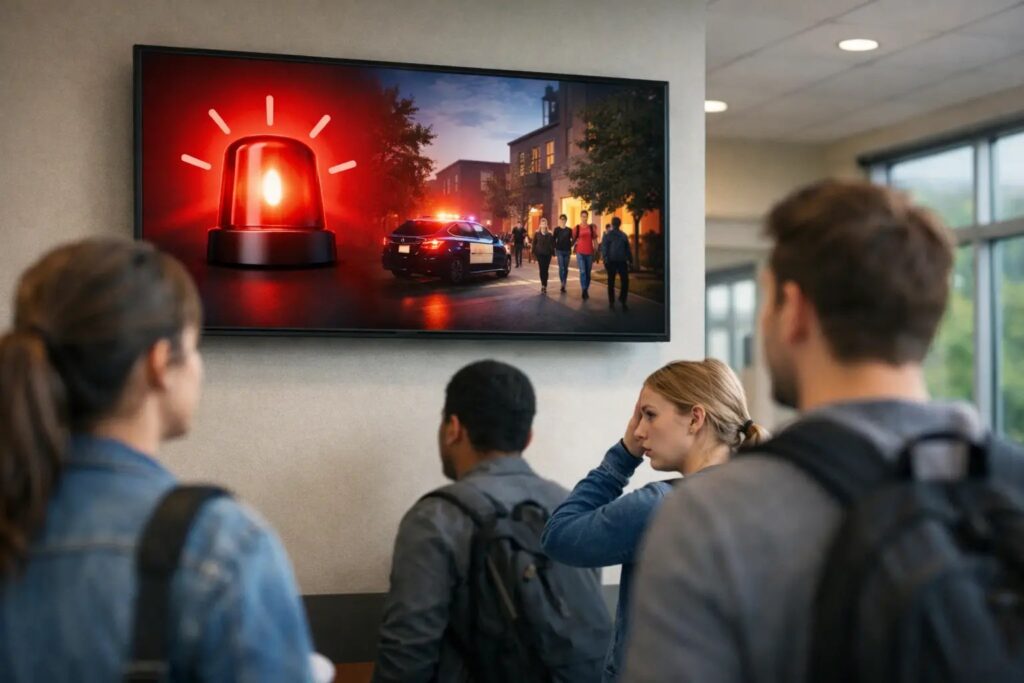
A lockdown message that appears 20 seconds late in one building and not at all in another is not a screen problem. It is a communication system problem. Campus emergency alert screens only work when they are planned as part of a larger response process, with clear ownership, fast publishing, and dependable playback across every location that matters.
For colleges, K-12 districts, and multi-building campuses, that distinction matters. Screens in lobbies, hallways, cafeterias, admin offices, and common areas can push urgent instructions faster than printed notices or manual door-to-door communication. But speed alone is not enough. The message has to be visible, understandable, and easy to trigger under pressure.
Why campus emergency alert screens matter
Most campuses already use screens for announcements, events, lunch menus, donor recognition, and wayfinding. In an emergency, those same displays can become a high-visibility communication channel that supports text alerts, PA systems, email, and other response tools. They are not a replacement for those systems. They are a reinforcement layer that helps people see instructions where they already are.
That visual reinforcement is especially useful in noisy spaces, in areas where people may not hear an announcement clearly, or when visitors are on site and are not enrolled in text notifications. A well-placed display can cut through confusion with a simple instruction such as shelter in place, avoid west entrance, or move to designated assembly area.
The value is not limited to extreme events. Weather closures, delayed dismissal, facility issues, traffic rerouting, and localized incidents also require quick communication. In practice, the campuses that get the most from emergency alert screens are often the ones using them consistently for routine operational messaging too. Staff know the system, the templates are ready, and no one is trying to learn a new process in the middle of a stressful moment.
What makes emergency screens effective on campus
The hardest part is rarely putting up displays. The harder part is making sure the content workflow matches the reality of campus operations.
An effective system starts with simple message creation. If every alert requires a designer, a special file format, or a complicated publishing tool, response time suffers. Campus communications teams and administrators need a way to create and update messages quickly using tools they already understand. That is one reason familiar content workflows matter. When staff can build polished layouts in PowerPoint and publish them to screens without extra production steps, the barrier to consistent readiness drops.
Speed also depends on centralized control. A campus may need to target every screen, one building, or a specific subset such as residence halls or athletic facilities. A single command center for scheduling and screen management helps teams make those decisions without chasing individual devices.
Then there is readability. Emergency content should not look like a promotional slide with too much text and decorative elements. Strong alert screens use high contrast, large type, short instructions, and a clear hierarchy. People should understand the action in seconds. If the message needs a second read, it is already asking too much.
Campus emergency alert screens need the right governance
Many schools run into the same issue: the screens exist, but no one has defined who owns emergency publishing. IT may manage devices, communications may control branding, and campus safety may control the message itself. Unless those roles are agreed on ahead of time, the system can stall at the exact moment it is supposed to help.
The better approach is shared governance with clear boundaries. Campus safety or district leadership should approve message types and escalation rules. Communications should prepare standardized templates that are easy to read and easy to update. IT should make sure playback devices, network access, and failover considerations are covered. Facility leaders can help identify which screens are mission-critical and which are merely helpful.
This does not have to become a heavy project. In fact, the more practical the ownership model, the better. A small set of preapproved alert layouts, a limited number of authorized publishers, and a documented trigger process will usually outperform a more ambitious plan that no one can execute quickly.
Cloud or on-premises depends on your campus requirements
There is no single deployment model that fits every school. Some campuses prefer cloud-based management because it makes remote publishing and multi-site control straightforward. That can be a strong fit for districts, higher education systems, or organizations with lean IT teams that need centralized visibility across many screens.
Others need on-premises deployment because of network policies, security requirements, or the need for real-time local data control. That is especially relevant when alerting must integrate tightly with internal systems or operate within stricter infrastructure rules.
The key is not choosing the more technical option. It is choosing the one your team can maintain reliably. If a cloud platform gives your communications and operations teams the fastest path to publish and manage content, that matters. If on-premises control better matches your governance model and infrastructure, that matters more. A useful platform should support both paths without forcing the campus into unnecessary complexity.
Design standards matter more than fancy visuals
In emergency communication, clarity beats creativity. Campus screen templates should be plain enough to read at a distance and consistent enough that viewers instantly recognize an alert. Color can help, but it should not carry the entire message. Red backgrounds may signal urgency, yet the action still needs to be written in direct language.
That means avoiding clutter, small logos, rotating animations, and long explanatory paragraphs. The screen should answer three questions fast: what is happening, where does it apply, and what should I do now. Some alerts may also need a timestamp so viewers know the message is current.
It helps to prebuild different formats for different situations. A full-screen emergency interruption may be right for a lockdown or evacuation notice. A banner or zone-based layout may be enough for a weather advisory or building closure. Not every operational issue should take over every screen, and that trade-off matters. Overusing full-screen alerts can train people to ignore them.
Testing is where most campus screen strategies succeed or fail
A lot of organizations assume that because a playlist is running normally, emergency publishing will also work normally. That is not always true. Network bottlenecks, player configuration issues, outdated templates, and authorization confusion tend to show up during testing, not planning.
Regular drills should include the screen network, not just text notifications or PA announcements. Test how long it takes to publish a message to one building and to the full campus. Check whether displays in older facilities update at the same pace as newer ones. Verify whether front-office staff understand what should appear and who to call if something does not.
This is also where easy content management pays off. If the process to replace normal content with emergency messaging takes too many clicks or too much specialized knowledge, teams will hesitate. A simpler workflow is not just convenient. It is safer because it increases the odds of timely action.
Building a practical workflow for everyday teams
The strongest campus setups are usually not the most elaborate. They are the ones that non-technical staff can operate confidently.
A practical workflow looks like this: approved templates are created in a familiar format, alert messages are easy to edit, publishing rights are controlled, and screens are grouped by campus, building, or function. Day-to-day content uses the same platform, so the people responsible for communication stay comfortable with it. Scheduling, updating, and remote management become routine rather than special tasks.
That is where a product-led approach makes a difference. If staff can use PowerPoint to create screen content, publish it centrally, and manage playback across multiple displays without a complicated production stack, readiness becomes easier to sustain. For campuses that also need stricter infrastructure control or live data-driven updates, having cloud and on-premises options keeps deployment aligned with IT realities instead of fighting them.
Emergency preparedness is often discussed as a policy issue, but on campus it is also a screen operations issue. The message must get built, approved, pushed, displayed, and seen. Every step needs to be simple enough to hold up when the day gets complicated.
A campus does not need more technology for its own sake. It needs alert screens that are clear, fast, and manageable by the people already doing the work.
- SignageTube Cloud – cloud-managed signage on any TV
- SignageTube Live – real-time data on your screens
- Digital signage software – how to choose, and what matters
- Templates – 120+ ready-made designs
- Pricing – simple per-screen plans