
Introduction: Scope, Audience, and Importance
Courthouses are government buildings where judicial proceedings and legal administration take place. From arraignments to trials, these facilities serve citizens, lawyers, jurors, law enforcement officers, and administrative staff—all operating under time pressure and high stress. Clear communication is not optional; it is essential. This article explores how courthouses use real-time digital signage to improve communication and operations, focusing specifically on the unique needs and challenges of courthouse environments.
Scope:
This article focuses on the implementation and benefits of real-time digital signage in courthouses, with an emphasis on government and public service applications.
Target Audience:
The content is tailored for courthouse administrators, IT staff, and public sector decision-makers who are responsible for improving operational efficiency, communication, and public service delivery in high-stress, high-stakes environments.
Why This Topic Matters:
Effective communication in courthouses is critical for ensuring smooth judicial operations, reducing confusion, and enhancing public trust. Real-time digital signage offers a modern solution to streamline information flow, improve efficiency, and support the fair administration of justice.
Courthouses are physical buildings designed to house judicial functions, serving as the official seat of court systems. They provide secured spaces for courtrooms, judges’ chambers, and administrative support offices. Courthouses serve as the primary venue for the judicial branch to perform critical roles, including adjudication and dispute resolution, fair administration of justice, and protection of rights.
Real-time digital signage refers to networked screens that instantly update information such as dockets, courtroom changes, alerts, and wayfinding directions. Unlike paper postings or static signs, these displays can push changes within seconds via a central platform. Content management systems (CMS) for digital signage allow users to easily deploy and update content across multiple screens, streamlining communication and reducing manual effort.
This article is part of the Government and Public Services focus area for SignageTube Live. We will explore how real-time on-prem digital signage transforms courthouse operations, moving from static to dynamic displays that improve efficiency and engagement. Dynamic content can also incorporate images, such as stock images or court branding, to create visually engaging and informative displays.
- Speed: Updates reach screens instantly when schedules change
- Clarity: Dynamic content replaces cluttered bulletin boards
- Reduced confusion: Visitors navigate complex buildings with confidence
What Is a Courthouse? Core Functions and Purpose
Courthouses are physical buildings designed to house judicial functions, serving as the official seat of court systems. They provide secured spaces for courtrooms, judges’ chambers, and administrative support offices. Courthouses serve as the primary venue for the judicial branch to perform critical roles, including adjudication and dispute resolution, fair administration of justice, and protection of rights.
The Role of Courthouses in Government and Public Services
Courthouses form the physical backbone of the justice system at municipal, county, state, and federal levels. U.S. district courts, UK Crown Courts, and local municipal courts all rely on these facilities to deliver access to justice.
Types of Courts and Their Functions:
The judicial system in the United States is organized into three primary tiers: trial, appellate, and a court of last resort.
- State & Local Courthouses: Handle over 95% of legal business, including traffic violations, divorces, wills, and most criminal cases.
- Federal Courthouses: Host U.S. District Courts for cases involving federal laws, the U.S. Constitution, or disputes between parties from different states.
- U.S. Courts of Appeals: Intermediate courts that review decisions from district courts to determine if the law was applied correctly.
- U.S. Supreme Court: The highest court and final level of appeal, dealing with constitutional issues and cases of national significance.
- Trial Courts: Resolve disputes by determining facts and applying the law.
- Appellate Courts: Review cases for legal errors.
Courts interpret the Constitution, protect individual liberties, and uphold the rule of law against arbitrary government power.
Common courthouse functions include:
- Hearings, trials, and arraignments
- Mediation sessions and clerk services
- Jury selection and assembly
- Public records access and document filing
Consider the daily complexity: a typical county courthouse might manage 40+ hearings across 10 or more courtrooms in a single morning. The National Center for State Courts reports that U.S. courts serve more than 100 million people annually.
Pain points in traditional communication:
- Long queues at information desks asking for courtroom assignments
- Printed paper dockets taped to walls, outdated within minutes
- Last-minute courtroom changes announced verbally over PA systems
- Cluttered bulletin boards hard to read for first-time visitors or non-native speakers
Understanding these foundational roles and challenges sets the stage for exploring how digital signage can address communication gaps and operational inefficiencies in courthouses.
Definitions and Key Concepts for Courthouse Digital Signage
This terminology primer helps non-technical courthouse administrators and IT staff understand core concepts and highlights the importance of being able to clearly describe different types of digital signage features and workflows for effective decision-making.
- On-prem (on-premises) digital signage: All content and player control runs on servers or PCs within the courthouse network, ensuring data security and compliance with IT policies.
- Real-time updates: Content changes pushed to screens instantly without manual restarts or USB swaps.
- Playlist: A scheduled sequence of content items—dockets, announcements, maps, and public service messages—organized by time of day. Playlists help organize content items for easier management and reproducibility across multiple screens or schedules.
- Zones: Screen areas divided by function, such as top area for court seal and time, center for dockets, and side panel for alerts.
- Proof of play: Logging which content was shown, when, and on which screen—useful for audits and compliance documentation.
With these definitions in mind, we can now examine how real-time digital signage is applied in specific courthouse scenarios.
Why Real-Time Digital Signage Matters in Courthouses
In a courthouse, “real time” means the ability to change what appears on screen within seconds—when a judge is delayed, a courtroom is reassigned, or a hearing is rescheduled.
Minutes matter here. Missing a 9:00 a.m. call because signage was outdated can force rescheduling, wasting staff time and requiring litigants to travel again.
High-impact use cases:
- Live docket boards in lobbies showing current assignments
- Courtroom status displays indicating “In Session” or “Cleared”
- Jury assembly instructions with estimated wait times
- Security announcements and emergency alerts
Accessibility needs are equally critical: large fonts (28–36 pt minimum), high contrast, multi-language content, and ADA-compliant wayfinding with visual icons support the nearly 13% of the U.S. population with disabilities.
To see how these benefits play out in practice, let’s look at specific scenarios within the courthouse.
Real-Time Digital Signage Scenarios in Courthouses
This section presents concrete examples of how screens are used across different courthouse zones.
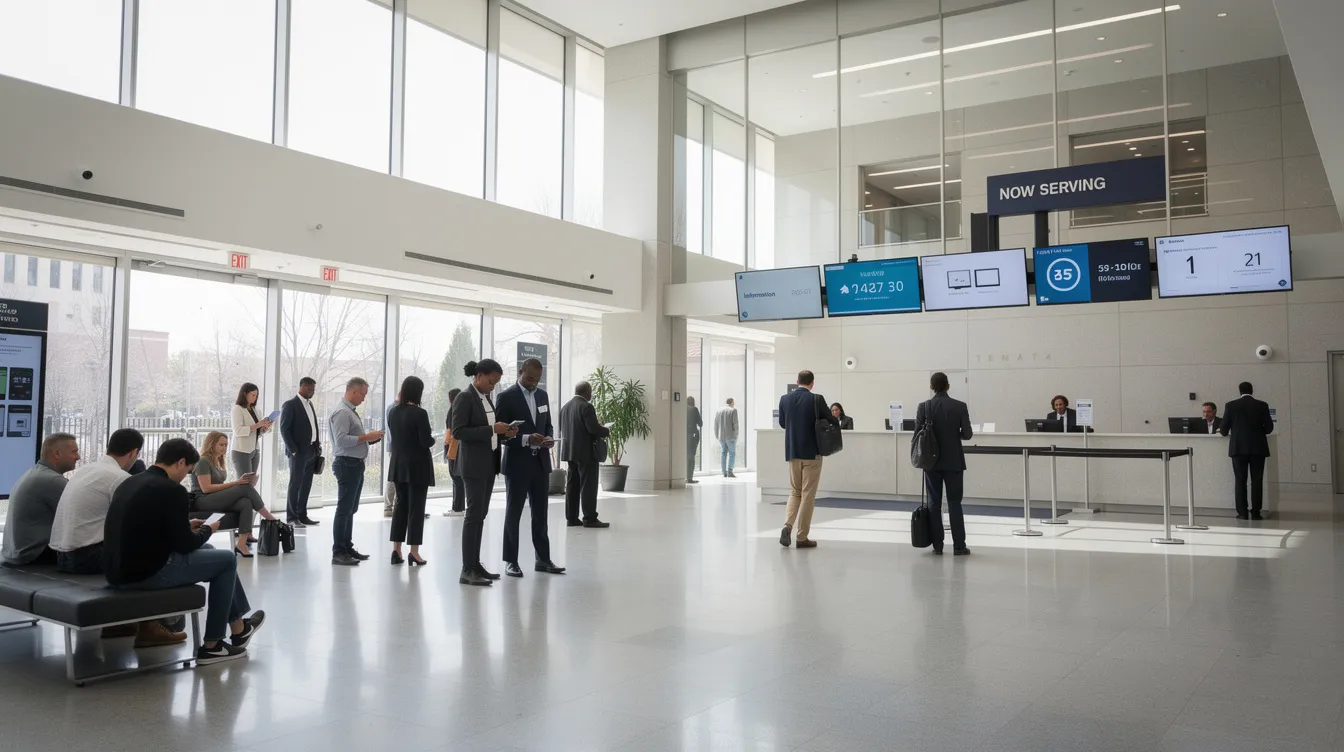
Lobby & Entrance: Screens display “Today’s Court Calendar” with case numbers, parties, courtroom assignments, and times. Content updates automatically as cases are continued or reassigned. Digital signage platforms support various file types, including images, and allow for the integration of dynamic content from multiple applications.
Wayfinding: Corridor displays near elevators show color-coded arrows for Criminal, Civil, Family, Probate, and Traffic divisions.
Courtroom Doors: Small screens show judge name, current case, upcoming case, and status like “In Session,” “In Recess,” or “Cleared.”
Jury Services: Screens in jury assembly rooms display juror numbers called, reporting instructions, estimated wait times, and reminders about phone restrictions.
Security & Clerk Windows: Screens show queue numbers, estimated service times, and real-time alerts for weather closures or evacuation messages.
Having seen these practical applications, let’s explore the steps and resources required to implement a digital signage network in a courthouse.
Workload and Time Required to Set Up Courthouse Digital Signage
Here is a realistic project timeline for a medium-sized courthouse with 8–12 courtrooms and 4–8 public displays.
|
Phase |
Duration |
Key Tasks |
|---|---|---|
|
Planning |
1–2 weeks |
Map screen locations, define zone content needs, engage judges, clerks, IT, security |
|
Hardware |
1–3 weeks |
Select commercial-grade screens and signage players (Windows, Android, SmartTV), install power and network drops |
|
Network/Security |
3–5 days |
Configure VLANs, firewall rules, internal DNS with IT |
|
Content Design |
1–2 weeks |
Create PowerPoint templates for dockets, wayfinding, alerts |
|
Pilot & Training |
1–2 weeks |
Test on subset of screens, train staff, collect feedback |
With SignageTube Live and existing PowerPoint skills, a courthouse can go from zero to fully operational in roughly 4–8 weeks.
Now that you have an idea of the setup process, let’s look at how to build and manage a digital signage network for courthouses.
Building a Digital Signage Network for Courthouses
Centralized Content Management
Implementing a PowerPoint-based digital signage solution is a transformative step for courthouses aiming to modernize communication and enhance customer engagement. Unlike standalone screens or manual updates, a digital signage network connects multiple displays throughout the court, allowing administrators to manage and update content from a single, intuitive interface. This centralized approach ensures that critical information—such as court schedules, announcements, and wayfinding directions—is always accurate and consistent across every location.
Cloud-Based Solutions
With the availability of cloud-based digital signage software, courthouses can create and deploy dynamic content without significant upfront investment. These platforms empower staff to design, schedule, and manage digital signage content efficiently, even with limited technical resources. Whether updating a daily docket, broadcasting emergency alerts, or sharing public service messages, the ability to manage content across as many screens as needed streamlines operations and reduces the risk of outdated or conflicting information.
A well-structured digital signage network also supports the court’s business goals by improving the visitor experience. Clear, real-time updates help reduce confusion, minimize wait times, and foster a sense of transparency and professionalism. By leveraging digital signage, courthouses can create a welcoming environment that keeps all audiences informed and engaged, while also freeing up staff to focus on higher-value tasks.
Ultimately, building a digital signage network with the right tools and software enables courthouses to deliver timely, relevant information to every corner of the building—supporting both operational efficiency and superior public service.
With the network in place, it’s important to understand the limitations of traditional approaches and why digital signage is a superior solution.
Challenges of Traditional and Alternative Approaches
Many courthouses still rely on paper, bulletin boards, or ad-hoc announcements. Here is how these approaches compare:
- Paper postings: Staff spend hours daily printing and taping dockets. Information becomes outdated within minutes when judges change schedules.
- Static wall signage: Permanent maps become inaccurate as courtrooms are repurposed or departments relocate.
- Email/intranet only: These tools help employees but exclude visitors standing in the lobby.
- DIY USB media players: Copying presentations to USB sticks and updating each device manually is error-prone and impossible for true real-time changes.
- Third-party ad networks: Government facilities face privacy concerns, lack of content control, and conflicts with non-commercial public service missions.
Each alternative wastes staff time, increases confusion, and creates risk of missed hearings.
To ensure a successful digital signage deployment, data security must be a top priority.
Data Security Considerations for Courthouse Digital Signage
Secure Data Pipelines
When deploying a digital signage network in a courthouse, data security must be a top priority. Courthouses handle sensitive information daily, and any breach could compromise not only the signage system but also the integrity of court operations and public trust. Ensuring that your digital signage is secure, reliable, and compliant with regulations is essential for maintaining the court’s reputation and achieving business goals.
A robust digital signage system begins with secure data pipelines, designed and maintained by skilled data scientists and IT professionals. These experts are responsible for implementing and monitoring the flow of information from court databases to public screens, ensuring that only authorized, non-sensitive data is displayed. Regular updates and patches to operating systems and signage hardware are critical to closing security gaps and protecting against emerging threats.
Authentication and Access Control
Free digital signage software can offer a cost-effective entry point, but it’s vital to evaluate its security features. Look for platforms that provide encrypted data transmission, secure authentication, and detailed access controls. An intuitive interface not only streamlines content management but also reduces the risk of human error—a common cause of data breaches in digital signage networks.
Dynamic content is a powerful tool for customer engagement, but it must be managed carefully. Only authorized personnel should have access to update or schedule content, and all changes should be logged for accountability. In cities like San Francisco, where technology is deeply woven into public services, the ability to manage as many screens as needed—while maintaining strict data security—is a must.
Analytics and Monitoring
Advanced analytics and monitoring tools can help uncover patterns of potential security threats, allowing organizations to take proactive measures. Real-time dashboards provide insights into system status, alerting administrators to unusual activity or unauthorized access attempts. Regular security audits and penetration testing, as recommended by researchers and security experts, are essential for identifying vulnerabilities and refining protection strategies.
Staff Training and Protocols
In addition to security, it is crucial to identify and mitigate bias in data collection, analysis, and decision-making processes related to digital signage. Applying ethical data science practices—such as using checklists, debiasing techniques, and raising awareness—helps ensure objectivity and fairness in both content and analytics, supporting transparency and trust in courthouse communications.
Integrated apps and third-party tools can enhance the features and benefits of your digital signage, but they must be thoroughly vetted for security risks before deployment. Whether managing content via a web browser or phone app, always use secure authentication and encryption to protect against unauthorized access.
Documenting security protocols and procedures ensures that all employees and stakeholders understand their roles in maintaining system integrity. Training staff on best practices, organizing access around the principle of least privilege, and promptly installing security updates are all critical steps in safeguarding your courthouse’s digital signage.
Ultimately, responsible management of digital signage means balancing accessibility with protection. By deploying secure hardware, maintaining up-to-date software, and fostering collaboration between engineers, IT professionals, and courthouse administrators, you can deliver a reliable, secure, and engaging experience for all audiences. This commitment to data security not only protects sensitive information but also strengthens public confidence in the court’s ability to operate transparently and effectively.
With security addressed, let’s examine the operational and public service benefits of real-time digital signage in courthouses.
Benefits of Real-Time On-Prem Digital Signage in Courthouses
Operational Efficiency
- Operational efficiency: Fewer desk inquiries, reduced phone calls, smoother movement through the building
Improved Attendance and Public Trust
- Reduced no-shows: Visitors see real-time updates when courtrooms move or hearings delay
- Public trust: Modern, clear communication reflects a professional, transparent justice system
Emergency and Accessibility Support
- Emergency support: Screens instantly switch to evacuation instructions or lockdown notices
- Accessibility: Multi-language slides, pictograms, and clear typography help diverse users
Internal Coordination
- Internal coordination: Clerk offices, security, and administrators see consistent information across floors
Research indicates 74% of people make faster decisions with digital displays, and perceived wait times drop when screens provide relevant information.
To maximize these benefits, it’s important to design effective screen content tailored to courthouse needs.
Designing Effective Courthouse Screen Content with PowerPoint
PowerPoint serves as a practical design tool for courthouse signage content, allowing teams to leverage existing PowerPoint skills for digital signage.
- Template strategy: Build standardized templates (lobby docket layout, courtroom door sign, jury instructions) for visual consistency
- Readability: Use large fonts (28–36 pt), high contrast (dark text on light background), and avoid dense text blocks
- Information hierarchy: Place critical information (case list, courtroom number, status) in the center; secondary notices in side zones
- Localization: Create language variants (English, Spanish) and schedule them to alternate
- Court branding: Include seals and logos while keeping layouts uncluttered
With SignageTube Live, these PowerPoint files upload and schedule directly—no conversion to complex formats required, following the same principles described in our complete guide to using PowerPoint for digital signage.
Once your content is ready, the next step is to deploy and manage it efficiently using the right platform.
Using SignageTube Live for Courthouses
SignageTube Live is our real-time, on-prem digital signage solution designed for courthouses and public sector buildings.
- Real-time on-prem control: All updates are centrally managed within the courthouse network, delivering fast updates and compliance with IT policies
- PowerPoint integration: Staff design slides in Microsoft PowerPoint and publish directly to selected screens or groups
- Scheduling and playlists: Create weekly or daily playlists for different floors (Criminal Division Floor 3, Civil Division Floor 4)
- Screen grouping: Group screens by zone (lobby, corridors, jury rooms) to send tailored content without managing each device individually
- Monitoring and proof of play: Our platform provides live player status and logs content history for audits. Digital signage software often includes features for user role management and access control to ensure only authorized users can make changes. Many digital signage platforms also offer customer support to assist users and customers with their needs.

Let’s see how this workflow looks in practice for courthouse staff.
How SignageTube Live and PowerPoint Work Together in Practice
Here is a concrete workflow for a courthouse using PowerPoint plus SignageTube Live.
Example: Monday morning docket update for a county courthouse.
- Step 1: Clerk opens the PowerPoint docket template, updates the date to “Monday, 16 March 2026,” and enters case numbers from the case management system
- Step 2: Clerk saves the file and uploads it to SignageTube Live, assigning it to the “Lobby Docket Screens” playlist
- Step 3: At 8:45 a.m., a judge reassigns cases. Clerk edits the PowerPoint file, re-uploads, and pushes an immediate update to all lobby screens
- Step 4: For courtroom door screens, a cropped slide deck showing only current and upcoming cases is updated via SignageTube Live
No specialized design team or coding skills required—court staff use existing Microsoft Office skills to maintain accurate signage.
To ensure a smooth rollout, consider these practical project tips.
Tips for a Successful Courthouse Digital Signage Project
These practical tips help project leads implement reliable courthouse signage.
- Start small: Pilot with main lobby plus two high-traffic floors before expanding
- Assign ownership: Identify a small group (clerk’s office plus IT) responsible for content and technical health
- Standardize templates: Use a small library of approved PowerPoint templates
- Coordinate with security: Integrate emergency messaging so security can override normal content
- Train backup staff: Ensure 2–3 people per courthouse know SignageTube Live basics
- Collect feedback: Place QR codes linking to staff surveys to refine layouts
With these strategies, your courthouse can maximize the value of digital signage and ensure long-term success.
Why SignageTube Live is a Strong Fit for Government and Public Services
Courts, city halls, and licensing offices share common needs: secure on-prem control, clear citizen information, and limited technical staff.
SignageTube Live is built to be manageable by small IT teams, supporting standard hardware (Windows, Android, SmartTV) often already present in public institutions. The platform combines on-prem security with cloud-like usability—central dashboards, live monitoring, and straightforward playlist management.
PowerPoint integration is a key differentiator. Organizations can handle design and updates using existing Office skills without external agencies. We offer free digital signage software trials and a library of digital signage best-practice articles, plus consultative help to plan phased rollouts tailored to each courthouse’s scale.
If you’re ready to get started, here’s a step-by-step action plan.
Next Steps for Courthouse Administrators
Use this action list to begin your digital signage network implementation:
- Audit current communication: Identify where visitors get lost, where bottlenecks form, and which announcements repeat frequently
- Identify 3–5 strategic locations: Main entrance, lobby, elevators, jury assembly, high-traffic clerk counter
- List existing infrastructure: Note compatible devices (Windows PCs, Android players, SmartTVs) that could connect with SignageTube Live
- Draft PowerPoint templates: Create basic layouts for dockets, wayfinding, and jury instructions
- Contact SignageTube: Get in touch with our team to explore how to deploy digital signage solutions seamlessly across your courthouse network, including deployment options, trials, and integration with courthouse systems
Modern, real-time digital signage is no longer optional for busy courthouses—it is a practical step toward clearer, fairer public service.